
AI assistant and knowledge base
Your team’s know-how, answered by AI
Upload your procedures once. Copilot answers your team from them and from your live data, spots what needs fixing and does the work, asking before it changes anything.

Made by The Flex, a rental company.
Our team uses it every day.
What is an AI knowledge base?
One source of truth for people and AI
A knowledge base holds your company’s procedures: how to handle a lockout, a late check-out or a refund. In Base360 it is also what AI reads, so Copilot and your inbox replies follow your rules, not a guess. It has two parts.
Knowledge Base · your proceduresPart 1 of 2
Upload it once, for your team and AI
1Upload
Upload the guides you already have
Drop in the guides your team already uses: PDF, Word or Excel files, up to 10 MB. AI files each one under the right topic and creates the topic if it doesn’t exist yet. Nothing to retype. It saves as a draft until you publish.
Or drop it in CopilotA file you drag into Copilot on the Dashboard lands in your Knowledge Base the same way.
2Publish
AI reads only what you publish
When the guide is ready, publish it. AI uses published documents only, so drafts and archived documents never reach an answer.
Each role sees only its topicsRead, create, edit and delete are set topic by topic, so a cleaner never gets an answer from finance.
3Guest replies
Guest replies come from your knowledge base
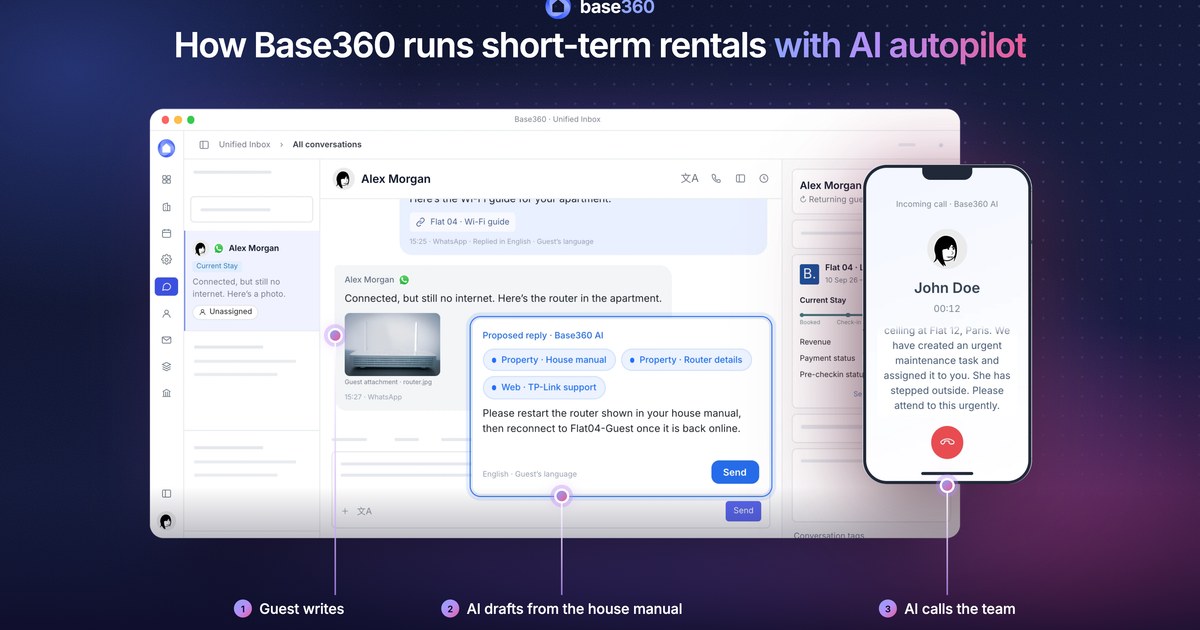
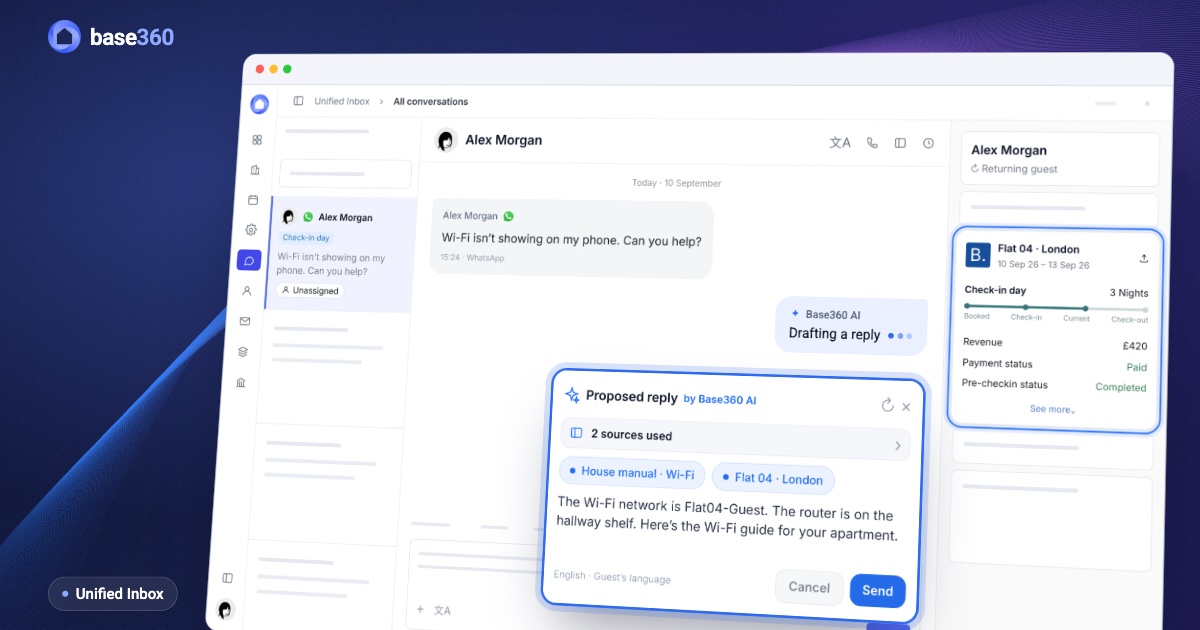
When a guest writes in the Unified Inbox, AI proposes a reply from your published documents and the property’s house manual. It shows which documents it used, so you check the reply and send it.
Live prices, not old notesPrices and availability always come from live inventory, not from a document.
Copilot · AI assistantPart 2 of 2
Ask, check, fix with your approval
4Ask
Your team asks, AI answers from your procedure
A guest is locked out at night. Your team asks Copilot, and it answers with your own steps and names the procedure it used.
See the sourceEvery answer shows the procedure behind it, so anyone can check.
5Your day
Ask about today, AI checks live data
Copilot reads your reservations, cleaning and maintenance, not only your procedures. Ask who checks in today and it tells you which flats still aren’t cleaned.
Across modulesOne answer can draw on bookings, cleaning and maintenance at once.
6No procedure
No procedure? AI doesn’t guess
If nothing in your Knowledge Base covers the question, Copilot says so instead of making up an answer, and you know what to write next.
Fill the gapPublish the missing procedure and Copilot uses it from the next question on.
7Worth a look
AI spots problems before your guests do
Copilot checks your properties and lists what needs fixing: a guest arriving today with no key instructions, missing check-in instructions, a channel that stopped syncing.
Fix with CopilotOne press writes the fix as a prompt and picks Chat or Cowork for the job. Nothing changes until you approve it.
8Hand it a job
Hand it a job, AI does the work
Tell Copilot what you need, such as cleaning tasks for tomorrow’s check-outs. In Cowork it checks the data, asks for your OK, makes each change and tells you when it is done.
Every step shownEach change is listed as it happens, so you can see exactly what Copilot did.
9Approval
AI asks first, or works on its own
In Manual mode Copilot asks before each change. In Auto it works on its own and still stops for deletes, messages, money, going live, access and building-wide check-in.
Chat or CoworkChat only reads. Cowork is where Copilot makes changes.
10Spend
AI spend stays under control
Each person has a daily AI limit. When it is reached, Copilot stops and an admin can raise it in Unified Billing.
No surprise billsEach person has a daily limit and the company has its own balance. Only an admin can raise them.
FAQ
Common questions
What is the Base360 knowledge base?
It is your company’s own library of procedures, organised by topic, such as customer service, cleaning or maintenance. Upload a PDF, Word or Excel file and AI files it under the right topic. Each procedure is a document with steps, checklists, photos and videos. Published procedures are what Base360 AI reads.
What is Copilot?
Copilot is the AI assistant inside Base360. Your team asks it questions and it answers from your knowledge base and your live data, such as reservations, cleaning and maintenance. It lists problems across your properties and, in Cowork, does the work, such as creating cleaning tasks, with your approval.
Can AI change things without asking?
Only if you choose Auto. In Manual mode Copilot asks before each change. In Auto it works on its own but still pauses for deletes, messages, money, going live, access and building-wide check-in. Chat mode only reads your data.
Will AI use my draft procedures?
No. AI uses published documents only. Drafts and archived documents are left out, so nothing reaches an answer before you publish it.
What if there is no procedure for a question?
Copilot says it found no matching procedure instead of guessing. You can then write one, and Copilot uses it once it is published.
Do guests see my internal procedures?
No. Guests only see the reply. AI proposes it in the Unified Inbox from your published documents and the property’s house manual, and you check it before it goes. Prices and availability come from live inventory.
Can I export my knowledge base?
Yes. Each topic has an Export button, so you can take its documents out of Base360 whenever you need them.
Can I control who sees which procedures?
Yes. Access is set topic by topic: read, create, edit and delete. AI answers each person only from the topics they can read.
Which AI models can Copilot use?
You choose. Copilot runs on Claude and OpenAI models, and you pick one from the model menu for each conversation.
How do I control AI costs?
Each person has a daily AI limit and the company has its own balance. When a limit is reached, AI stops until an admin raises it in Unified Billing.
Read next
-
-
 Pre-arrival guide How to set up online check-in for short-term rentals
 -
 AI operations guide AI-powered guest support and operation flow: who does what
 -
 Guest communication guide What a unified inbox for short-term rentals should actually do
Let’s talk about
your rental business.
Send us your questions or ideas, and we’ll get back to you soon.