
Dynamic pricing for short-term rentals
Nightly prices, on AI autopilot.
Every night of every listing gets its own price, built from your base price, seasons, events and how full you are. AI adjusts it daily and sends it to your channel manager. Big changes wait for you, and Claude changes prices when you ask.

Made by The Flex, a rental company.
Our revenue team uses it.
What is dynamic pricing?
Every night priced on its own
Dynamic pricing for short-term rentals changes each night’s rate as demand, the season and your occupancy change, instead of keeping one fixed price. In Base360 it works in three parts.
- 1Every dayAI pricingBase360 adjusts every night’s rate each day, on its own.
- Daily price changes
- Long stays compared with short stays
- Orphan gaps between bookings
- Approval for bigger changes
- 2UnderneathYour rulesThe rules every price is built on, and you can check them.
- Base and minimum price per listing
- Seasons, occupancy and group rules
- Prices for chosen dates
- Price breakdown and channel sync
- 3When you askClaudeClaude reads your listings in Base360 and changes prices when you allow it.
- Portfolio review
- Price changes you approve
- New listing prices
- Pricing strategy from your booking history
AI pricing · every day, on its ownPart 1 of 3
AI adjusts prices every day
1Long stays
Compare long stays with short stays
Base360 compares what a 30-night stay earns after costs and taxes with what the same nights would earn as short stays.
Net revenueIt compares what you keep, not how full the calendar looks.
2Orphan gaps
Fill the gaps between bookings
Base360 shortens the minimum stay and lowers the rate for short gaps between bookings, so they can still sell. Here a three-night gap drops to a 1-night minimum and £135.
Gap rulesSet the minimum stay for each gap length, for each group.
3Daily limit
Bigger changes wait for your approval
AI moves a price by up to 10% a day and 20% a week. Anything bigger waits for someone on your team to approve or turn it down.
Claude still asksA change you ask Claude for is saved only after you allow it.
4Missing prices
Find listings with no prices
Copilot lists the listings that have nights with no price. Hand them to Copilot to fix, or set the prices yourself.
Ask about pricesIn Chat, Copilot reads any listing’s prices, for example the next two weeks.
Pricing rules · checked and sharedPart 2 of 3
Rules you can check night by night
5Listings pricing
See which listings need a new price
Listings pricing shows each listing’s group, sync, occupancy from 30 to 365 days, ADR and RevPAR, in columns you choose for the whole team. A new listing starts from a group and two prices, or from its current nightly price.
On the Multi CalendarEvery open night shows its price and minimum stay next to your bookings.
6Seasons and events
Price seasons and city events
Seasons raise or lower a group’s base and minimum price between two dates. Events and public holidays from Base360’s catalog, or your own, replace the season’s change on their days.
Over New YearA season ends within its year, so a winter season takes two rows.
7Group rules
Share rules across a group
Group rules set minimum stays once for many listings: close to arrival, far out, right after a checkout and for gaps. Seasons, occupancy changes and an adjustment for how full the whole group is are shared too.
The listing comes firstA listing’s own stay limits and occupancy replace the group’s.
8Price breakdown
See every rule in one night’s price
Base360 starts from each listing’s base price, then applies seasons, occupancy and date overrides. The breakdown shows each step down to the final rate. Booked nights keep the price the guest paid.
Occupancy tablePrices move with how far ahead a date is and how full the listing is.
9Channel sync
Send prices to your channels
Saved prices update Base360’s calendar at once. With sync on, Base360 queues them for your channel manager, and each channel the listing is mapped to has to accept them.
Already use PriceLabs?Listings PriceLabs manages keep their PriceLabs prices.
Claude MCP · pricing in a conversationPart 3 of 3
Change prices by asking Claude
10Portfolio review
Ask how your listings are doing
Claude connects to Base360, reads occupancy and revenue across your listings and points out the ones falling behind.
Only what you allowYou choose what Claude may see and change. No API key or code.
11Price changes
Approve the change, Base360 saves it
Claude proposes a new price and asks before it saves anything. You can allow it once, always allow it, or deny it.
One change at a timeApprove changes one by one until you trust Claude’s pattern.
12New listings
Price new listings in one message
Claude sets up new listings from one message: the base price, the minimum price and the group.
Sync stays offNothing reaches your channels until you ask Claude to turn sync on.
13Pricing strategy
Turn booking history into a pricing strategy
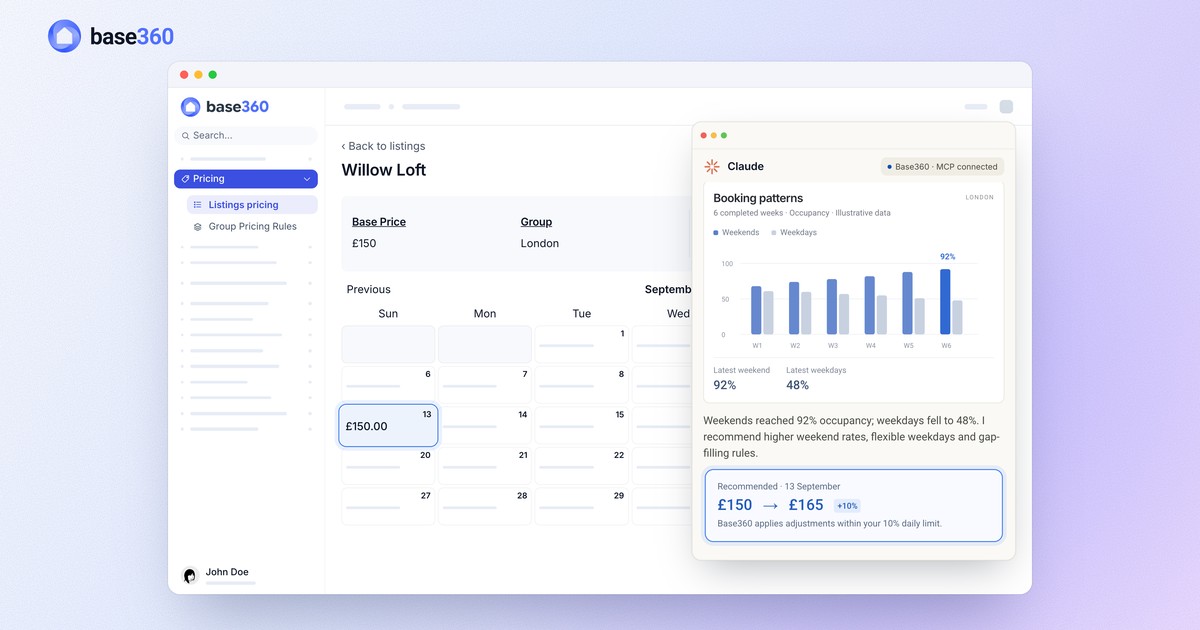
Claude reads your past bookings and suggests prices. Here weekends ran at 92% and weekdays at 48%, so it raises 13 September from £150 to £165.
Then AI takes overFrom then on, AI adjusts each night’s price every day, up to 10% a day.
FAQ
Common questions
What is dynamic pricing for short-term rentals?
Dynamic pricing changes each night’s rate as demand, the season and your occupancy change, instead of keeping one fixed price. In Base360, each listing has a base and a minimum price, groups of listings share seasonal, occupancy and minimum-stay rules, Claude reviews and updates prices through MCP, and AI adjusts them every day within daily limits.
Can Claude change my prices in Base360?
Yes, if you allow it. Once you connect Claude to the Base360 MCP server and give it permission to change prices, Claude can read your listings’ performance, recommend changes and save the prices you approve back into Base360.
Will AI change prices without asking me?
Claude asks before it saves a change, unless you choose to always allow it. Base360’s daily AI adjustments are limited too: up to 10% in a day and 20% in a week. Anything bigger goes to a person on your team to approve.
Do I need a developer to connect Claude?
No. You add Base360 as a connection in Claude, sign in, and choose on one short screen what Claude may look at and change. There is no API key or custom code. ChatGPT can also connect, to read your Base360 data.
Do I need a paid Claude plan?
No. Base360 is added to Claude as a custom connector, and Claude allows custom connectors on every plan, including Free, where you can add one. On Team and Enterprise plans, an owner adds Base360 for the organisation first. In Base360, the Claude connection is part of Autopilot and Enterprise.
Can I see why a night costs what it does?
Yes. Open any date in the pricing calendar to see the base price, the seasonal change, the change for how full you are, the minimum price and the final rate. A booked night shows the price the guest paid, which can differ from today’s rate.
Do new prices go straight to Airbnb and Booking.com?
Not instantly. Saved prices are queued to your connected channel manager, and each channel then has to accept the update. After a large change, open the listing on Airbnb or Booking.com to check it.
I already use PriceLabs. Do I still need Base360 pricing?
You can use both. Keep your PriceLabs strategy and connect the Channex-linked listings you want it to manage. Base360 uses the nightly prices and stay limits PriceLabs sends, does not write over them, and tells you if a price refresh fails or only partly completes. On dates PriceLabs has not priced, a listing already set up in Base360 falls back to your Base360 rules. Listings you leave out of PriceLabs use Base360 pricing and Claude.
Can I import my pricing rules?
Yes. Occupancy adjustments, date-specific prices and seasonal rules can each be downloaded and uploaded as CSV files. Moving from another system is free: our AI onboarding agent loads your properties, rates, bookings and guests into Base360.
Can I set a listing’s price from its property details?
Yes, for listings Base360 prices. Saving a nightly price in a listing’s Property Details also updates its base price in Pricing, or sets pricing up if the listing has none yet, and the pricing calendar refreshes.
How do I find new listings that have no pricing yet?
They wait under New listings in Listings pricing. When a full property sync in Channel Management finds a listing without pricing, Set up pricing takes you straight to its Initialize pricing window.
Do group rules replace a listing’s own settings?
No, the listing comes first. Stay limits and occupancy adjustments set on a listing replace its group’s. Turn them off and the group’s rules apply again, or 1 to 1,125 nights if the group has none. Groups never share base or minimum prices, and deleting a group leaves each listing’s pricing settings in place.
Can a fixed price for chosen dates go below my minimum price?
Yes. A price override for chosen dates can go under the listing’s minimum price, unless you also set a minimum price for those dates.
How are ADR and RevPAR year to date counted?
From 1 January, or from the listing’s first contract if it started later in the year. Listings pricing also shows occupancy for the next 30, 60, 120 and 365 days.
How far ahead does Base360 calculate prices?
500 days from today. Every night in that window gets a price and a minimum stay.
Can I control who can change prices?
Yes. Pricing has separate rights to view, set up, change and delete, so someone on your team can check prices without changing them. The pricing list shows each person only the listings they have access to.
Is dynamic pricing included in Base360?
Yes, on Autopilot, which is £35 per property per month and includes the rest of Base360 and the Claude connection. On the free channel manager plan, dynamic pricing is an add-on.
Does Base360 pricing cover long lets?
Pricing covers your active short-let listings. Long-let rent is not set here. For short-let dates, Base360 can compare a 30-night enquiry with the short stays it would replace.
Read next
-
 Claude pricing guide How to connect Claude to your PMS and let it update your prices
 -
-
 AI workflows guide How to build AI agent workflows for short-term rentals
 -
 AI operations guide AI-powered guest support and operation flow: who does what
Let’s talk about
your rental business.
Send us your questions or ideas, and we’ll get back to you soon.