

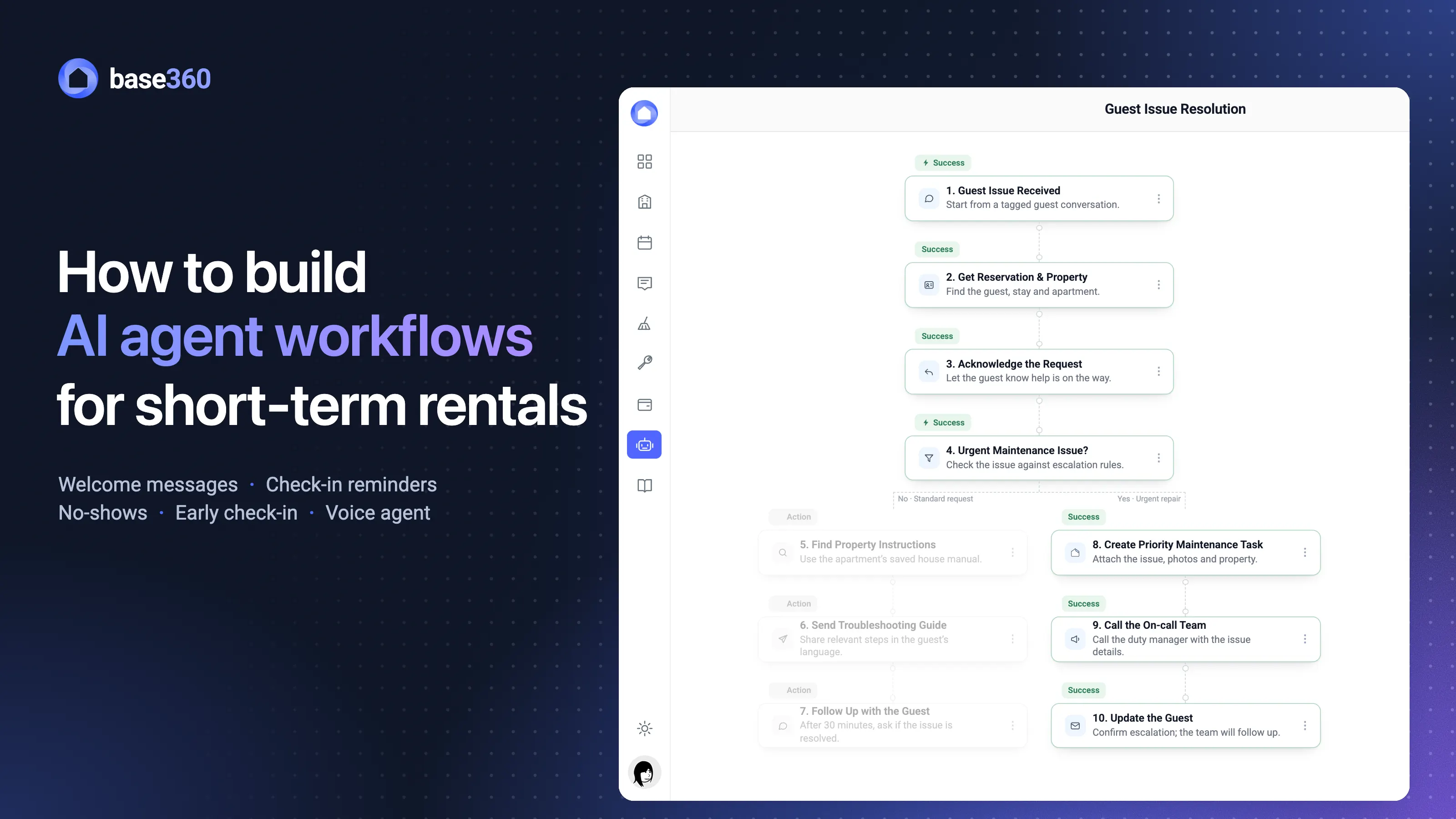

What an AI agent workflow is
Before every stay, the same messages have to go out: the welcome, the reminder to finish check-in, the door code on arrival day. Someone on your team sends them, booking after booking, and when one is missed, a guest ends up waiting outside the door.
An AI agent workflow takes that job off their hands. You set up the steps once, and Base360 runs them on every booking that matches, the same way each time.
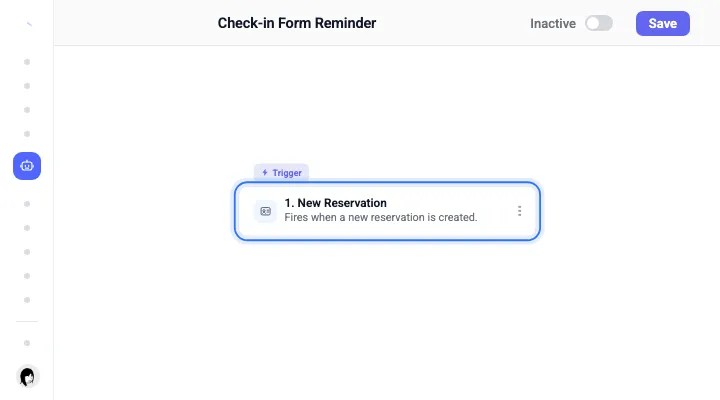
Those steps come in three kinds, and each has its own place in the builder. A trigger starts the workflow: an event, like a new reservation, or a moment, like three days before check-in.
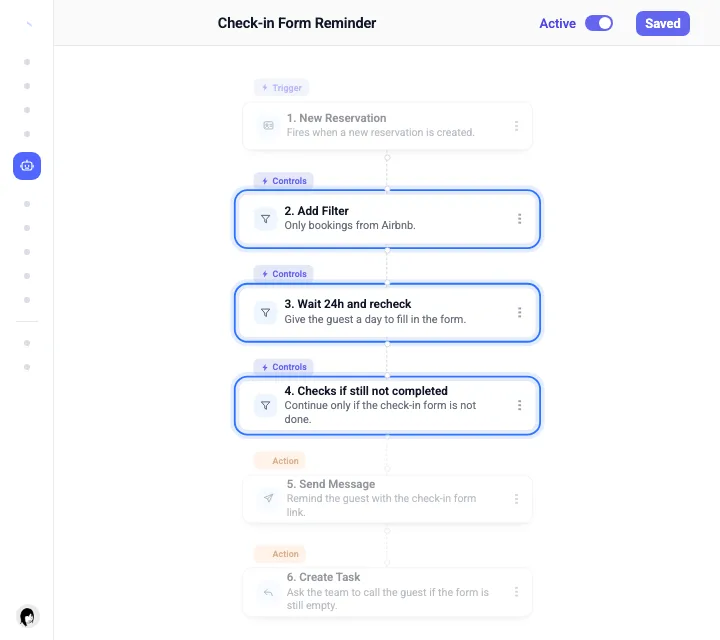
Checks and waits then decide whether it goes on: only Airbnb bookings, only if the check-in form is still empty, only after 24 hours.
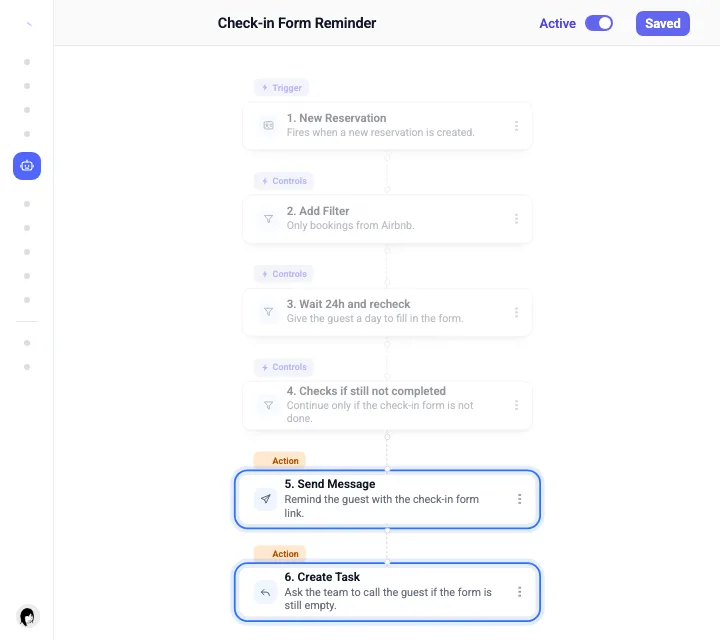
Once they are met, the actions do the work: they send the message, create the task, assign a teammate, approve a request or place a call.
None of it runs until you switch the workflow on, so you can build it and check it first. To see what it does once it is on, follow one demo guest through a week.
Saturday, 12:05A demo booking, not a customer case. Alex Morgan walks into Rowan Court with the door code, after a welcome message, two reminders and an early check-in. Nobody on your team sent any of it.
Every section below is one of the workflows that got Alex there, starting with how the first one was built.
Three ways to start
The first workflow has to come from somewhere, and Base360 gives you three places to start it: a blank canvas, a template, or one line typed to the AI assistant.
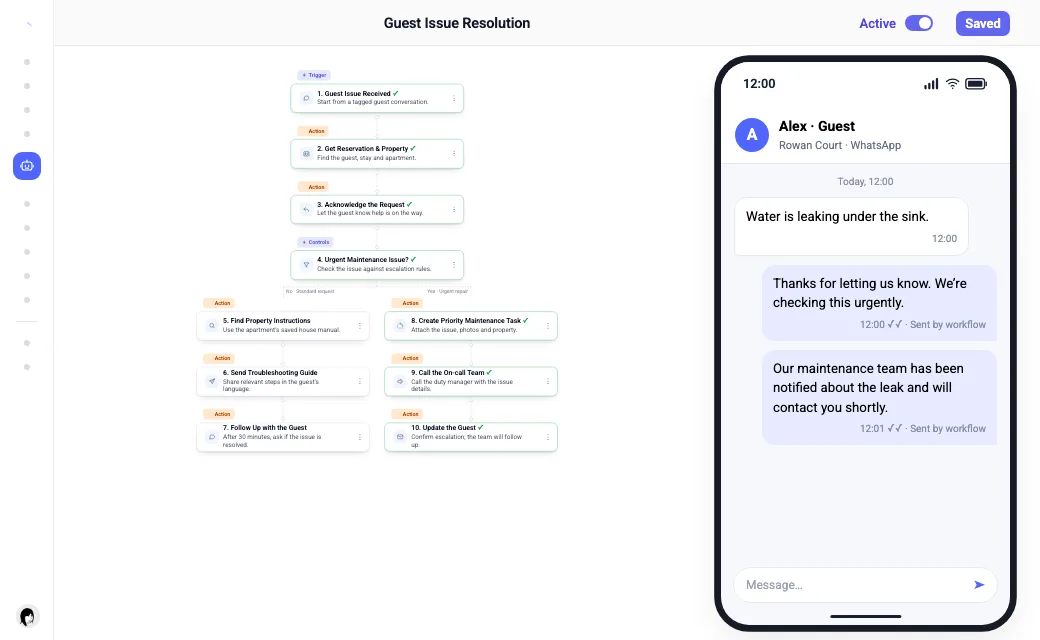
Before any bookingJohn Doe, who runs operations, types one line: “Handle guest issues: escalate urgent repairs, share property guides and follow up.” The assistant drafts the steps on the canvas for John to check.
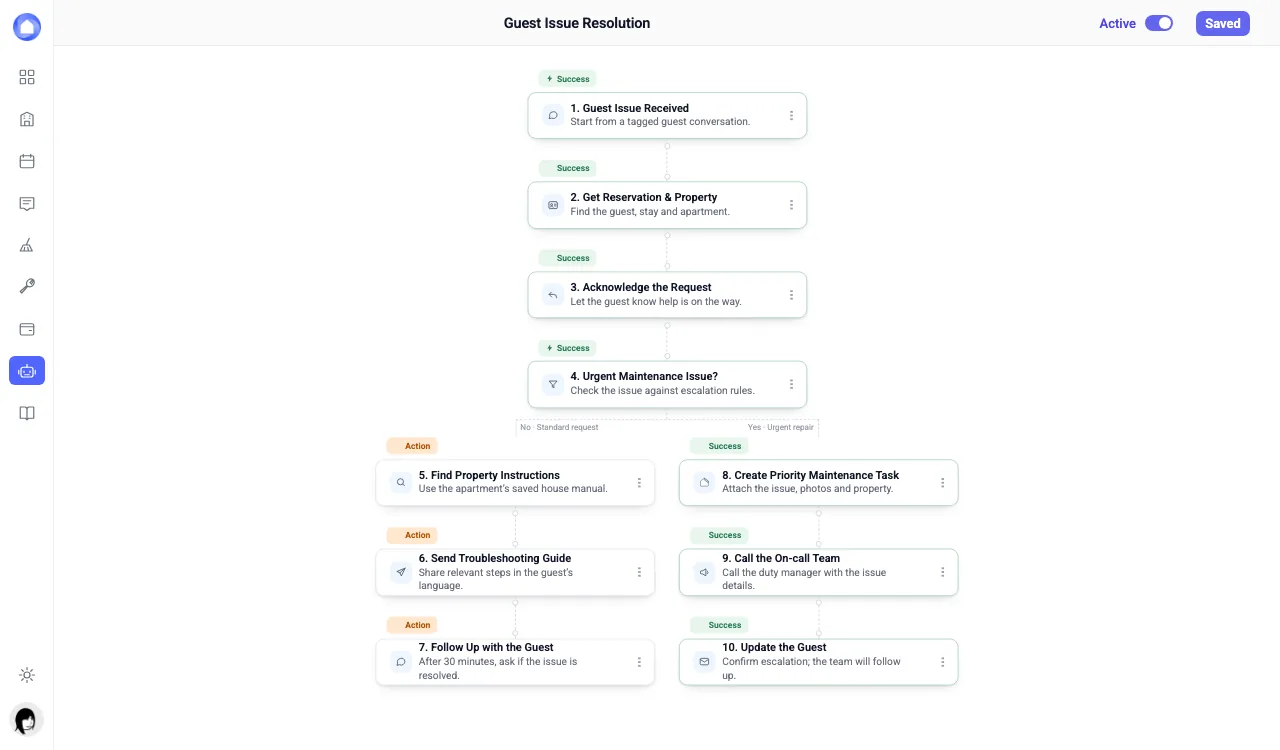
The assistant is the route John took: you say in one line what should happen, and it hands you a draft on the canvas to edit before you save. When the job is a common one, a template gets you there even faster, because the welcome email, the pre-check-in reminder, the no-show check and the early check-in approval come ready-made. Anything the templates do not cover belongs on the blank canvas, where you pick a trigger and add the steps one by one.
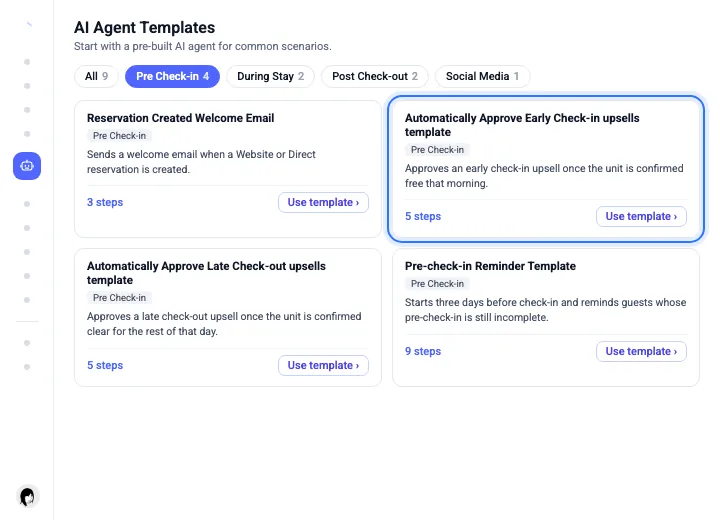
TipStart with a template, then change the timing and the wording. It is quicker than starting from nothing.
A welcome message on every booking
With the builder open, the natural first workflow is the one every guest meets: when a reservation is created, send a welcome message on the channel the guest booked through.
Sunday, 14:12Alex books Rowan Court on Airbnb for next Saturday. Two minutes later the welcome message is in the Airbnb thread. John Doe is at lunch.
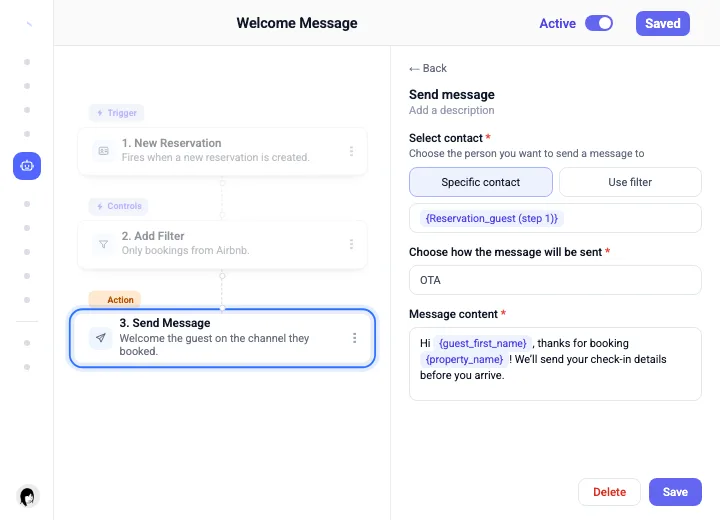
Behind that one message sit three decisions. The first is which bookings it covers, all of them or a single channel, set with a check on the booking source. The second is where it goes: the booking channel itself (the same thread your unified inbox shows), email, SMS or WhatsApp, or several at once, with a fallback channel ready if the first is unavailable. The last is what it says, and since the message can pull fields from the booking, like the guest’s first name and the property, it greets Alex by name at the right address.
Good to knowWhatsApp only allows an approved template outside its 24-hour customer service window, so a first message to a new guest goes as a template.
Pre-check-in reminders that stop
A welcome goes out once, but the check-in form usually needs a nudge. A good reminder workflow checks before every nudge, and stops the moment the guest has done the job.
Wednesday, 10:00Three days before arrival, Alex has not opened the check-in form. The first reminder goes out. Thursday at 10:00 the workflow checks again: still empty. Second reminder. Alex fills it in on the bus, and nothing more is sent.
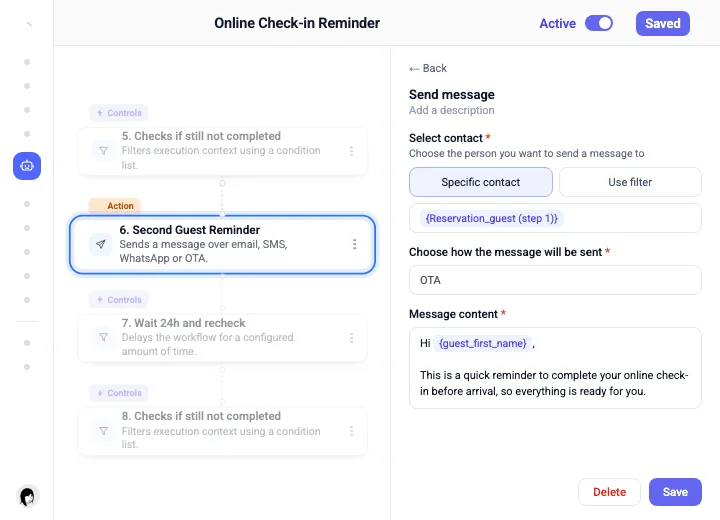
That is how the template is built. Three days before check-in it confirms that the booking is not cancelled, the property is active and the check-in form is still incomplete, and only then sends the first reminder. Twenty-four hours later it runs the same checks again, which is why the second reminder reached Alex only because the form was still empty. What stays in your hands is the timing, the number of reminders and the channel each one goes out on.
TipPut the check before every message, not just the first. A guest who finished after reminder one should never get reminder two.
Early check-ins approved for you
With the form done, the next request comes on arrival day: guests often want to arrive sooner. A workflow can approve an early check-in, or a late checkout, whenever the property is confirmed free for that part of the day.
Saturday, 09:40Alex asks for an early check-in in the guest portal. The last guest left on Friday, and nobody is checking out today. The workflow approves it, and the stay window moves to 12:00.
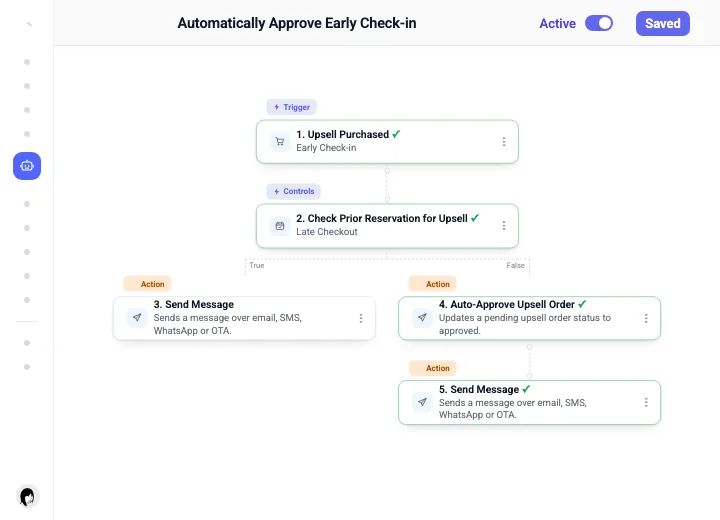
To confirm that, the template makes one check: did the guest leaving that day buy a late checkout? If not, the order is approved and the guest is told. If so, the request waits for a person in Orders Management. You set the earliest time you will allow, and whether the approval also messages the guest.
Good to knowAn approved early check-in moves the stay window earlier. Make sure the cleaning is finished by the new time.
A voice agent for guest calls
Once guests are inside, their questions come by phone as well as by message. An Incoming Call trigger can hand those calls to an AI voice agent, which answers from your knowledge base and passes the call to a person when your rules say so. How the rest of a guest issue flows is in our AI guest support guide.
Saturday, 22:15Alex calls to ask where to park overnight. The voice agent answers from the house manual, in Alex’s language. Had the call been about a leak, it would have been forwarded to the teammate on shift.
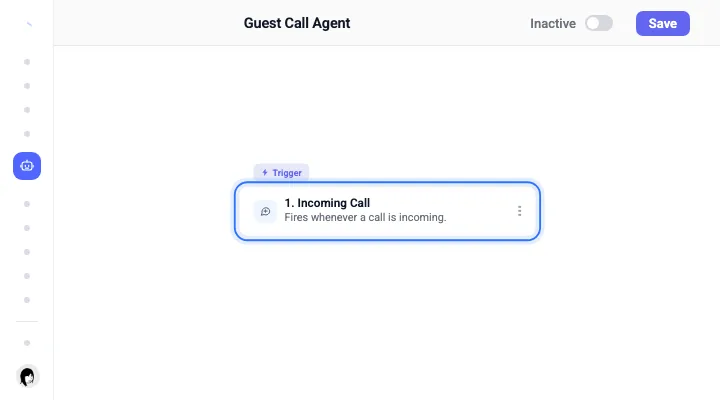
Setting it up is a one-time job: a voice, a greeting, a tone, and the context it may draw on, such as the property, the reservation and the knowledge base. What matters most comes next, the escalation rule that decides which questions, or which words, send a call to a human. Because the agent needs a connected phone number and no call is ever guaranteed to go through, keep a person reachable for the calls it hands over.
TipStart the voice agent on after-hours calls only. Listen to the first week of summaries before you widen it.
Catching a no-show early
One question is still open after check-in, and it is a simple one: did the guest actually turn up? A no-show workflow notices when they did not, and asks them what happened before you lose the night.
Sunday, 15:00Twenty-four hours after check-in, the workflow runs on Alex’s booking. The access code was revealed on Saturday, so it stops there. For the guest next door, the code was never opened, and a message goes out: “Are you still coming?”
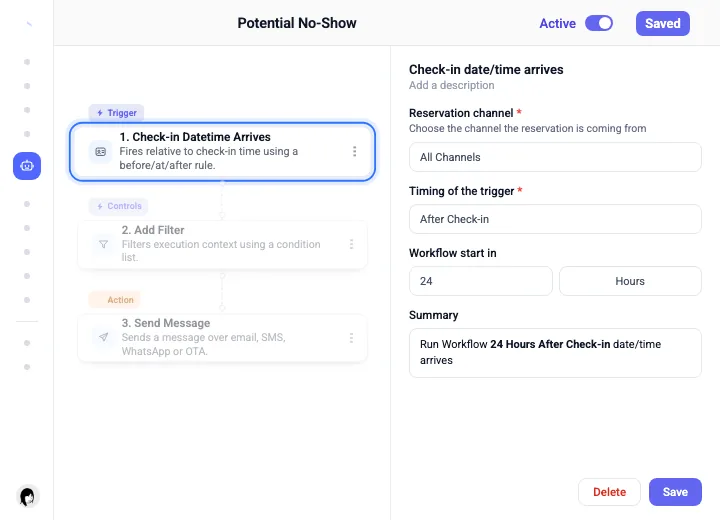
Its evidence is the guest portal, because a guest who revealed the door code has arrived, so all you choose is how long to wait after check-in and what the message says. If the answer confirms a no-show, what matters next is freeing the dates so the nights can sell again, and how you do that depends on the channel. On Airbnb, do not cancel the booking yourself; the payout follows your cancellation policy and a host cancellation carries a fee. On Booking.com, mark the no-show inside their window instead, so no commission is charged, and Base360 can add that step to the workflow where the channel is connected.
TipSend the no-show question on two channels. A guest stuck at an airport reads WhatsApp before email.
Switching on and checking runs
None of this week ran until someone switched it on. Every workflow starts inactive: you read the plan, save, and turn it on, and from that moment every run is on the record.
The Monday afterJohn Doe opens the Executions tab of each workflow. Alex’s week is there, run by run: the welcome, two reminders, one approval, one answered call, and one no-show check that stopped on purpose. One failed run from another booking gets a retry.
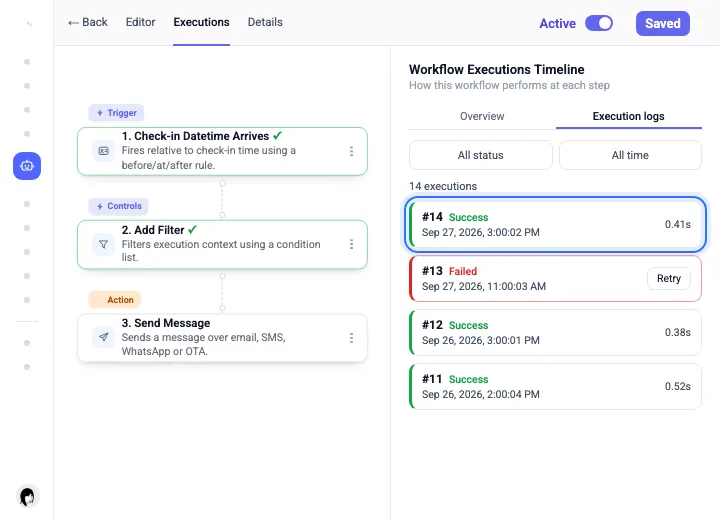
Reading the plan is where your control sits. Before you switch a workflow on, you can see every step it will take, and the steps that send messages or touch money are flagged.
That check matters because an active workflow runs without asking again, high-impact steps included. Afterwards, two records keep it readable: version history keeps every saved version, and the execution log shows which version ran and what each step returned. That is how John reads Alex’s week back on Monday.
Good to knowArchiving a workflow does not switch it off. Set it to inactive first.
Questions STR operators ask
What is an AI agent workflow for short-term rentals?
An AI agent workflow for short-term rentals is a saved automation made of a trigger, optional checks and waits, and the actions that follow, such as sending a guest message, creating a cleaning or maintenance task, or approving an early check-in. It runs on every booking that matches the trigger. In Base360 you can build one on a blank canvas, from a template, or by describing it to the AI assistant.
Does the AI decide what to do while the workflow runs?
No. In Base360 the plan is written and checked before the workflow is activated. An AI Agent step turns your goal into a visible plan of up to eight steps, and the workflow cannot be saved or switched on until that plan is verified. Once active, it runs the same plan every time, without asking a model what to do next.
Can automated messages go through Airbnb and Booking.com?
Yes, where the channel is connected and mapped in Base360. A Send Message step can use the booking channel (OTA), email, SMS or WhatsApp, and you can pick more than one. A fallback channel can be set for when the first one is unavailable. Delivery still depends on the channel and provider, so it is never guaranteed.
What should a vacation rental host do about a no-show?
Contact the guest first. A workflow can do this for you: some hours after check-in, if the access code was never revealed, it messages the guest and asks whether they are still coming. If it really is a no-show, do not cancel the booking yourself on Airbnb, because host cancellations carry a penalty; the payout follows your cancellation policy. On Booking.com, mark the reservation as a no-show inside their reporting window so no commission is charged. Then free the dates so the nights can sell again.
Can early check-in or late checkout be approved automatically?
Yes. Base360 ships templates that approve an early check-in or late checkout upsell when the property is confirmed free for that part of the day. The template makes one check: did the guest leaving that day buy a late checkout? If not, the order is approved; if so, the request waits for a person. An approved request updates the guest’s stay window.
Can an AI agent answer guest phone calls?
Yes. An Incoming Call trigger can start a workflow that hands the call to an AI voice agent. The agent answers from the context you give it, such as the property and the knowledge base, and it follows the escalation instructions you set, so a call it cannot handle is forwarded to a member of your team. It needs a connected phone number and the voice service, and a completed call is never guaranteed.
How do I know a workflow actually ran?
Open the workflow’s Executions tab. Each run shows its status, its duration, the exact version of the workflow that ran, and the result of every step. A failed run that is eligible can be retried, and version history lets you restore an earlier version of the workflow.