

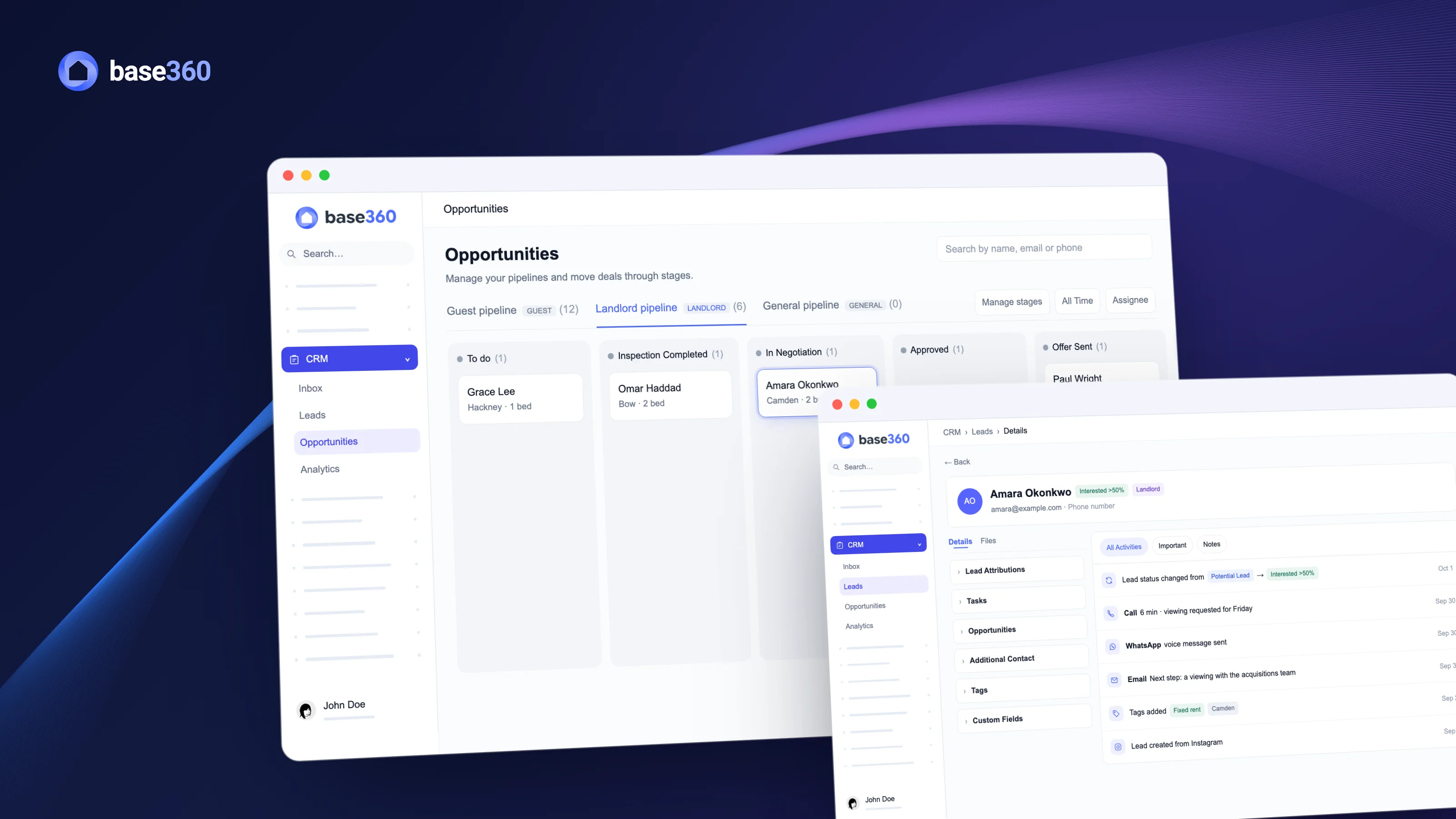
Where do landlord leads get lost?
A landlord messages you about a flat. Someone replies, a viewing gets mentioned, and then the conversation disappears into WhatsApp. A week later, nobody knows who was meant to call back, what rent the landlord wanted, or whether the viewing ever happened.
It happens because guest messages have a home in your PMS (property management system), and landlord enquiries usually don’t. They sit in a shared inbox, a DM thread or a spreadsheet that one person keeps up to date. A spreadsheet can hold the list. What it can’t do is bring the message in, tell the right person, remind them to call, and keep the history when someone leaves.
So the fix is to treat property owners the way you already treat guests: as leads, each with a source, a profile, a person on your team and a next step. To show what that looks like in Base360, we’ll follow one landlord through one week, from the first message to a signed agreement.
Tuesday, 09:10Amara Okonkwo sees your Instagram ad and sends a message: “I have a flat in Camden. Do you offer fixed rent?” It’s a two-bedroom flat, free from November. Amara is a demo landlord, not a customer case.
Landlord leads in their own list
In Base360, Amara’s message arrives in the inbox of the CRM, the part of Base360 that keeps your leads and deals. It sits next to your other enquiries, so whoever is on shift sees it, not only the person who runs your Instagram.
From that first message, Amara is a landlord lead. Base360 keeps landlords in their own list, apart from guests, because you ask them different questions. A guest wants dates and a price. A landlord wants to know what you will pay and how you will look after the flat. Landlords who fill in the form on your website, or write on WhatsApp or by email, land in the same list.
Each row holds what your acquisitions team needs before the first call. Some of it comes with the enquiry: Amara’s message already says Camden and fixed rent. The rest your team adds after the first reply, like the rent she expects and the date the flat is free. Whatever tool you use, these are the fields worth keeping on every landlord lead:
| Field | Why it matters |
|---|---|
| Location | Tells you which city team calls back, and whether you already run flats nearby |
| Bedrooms | Shows whether the flat fits the guests you already book |
| Asking price | The rent or fee the landlord expects, so you can check the numbers before a call |
| Available from | Sets how fast the deal needs to move |
| Fixed rent or management | Decides which offer you make. Management is often called co-hosting |
| Portfolio size | A landlord with five flats is worth a different first call |
| Source | Shows which channels and campaigns bring landlords |
| Assigned to and next step | Makes sure someone on your team does something next |
TipAmara’s source says Instagram. For campaigns, use UTM tags: short labels on an ad’s link that name its source, medium and campaign. A direct message doesn’t carry them, but a landlord who clicks through to your website form does, and Base360 keeps all five UTM fields on the lead. So when a deal is won, you can see which campaign that landlord came from.
The right city team, the same day
A list only helps if someone acts on it, and fast. So who on your team calls Amara back? Her flat is in Camden, so John Doe, who saw her message in the inbox, assigns her lead to the London team. A lead assigned to a team is visible only to that team and your admins.
Tuesday, 09:15The London team opens its list and finds Amara at the top. The Manchester team sees only its own landlords. As an admin, you see both.
Amara wrote on Instagram, so a person assigned her. Landlords who use your website form don’t need even that. An AI agent you build once in the AI Agents Builder reads the city on the form and opens a task for that city’s team: Landlord Lead, to contact, high priority, due the same day. You decide once which cities you split by, which team takes each one, and how quickly you want the call made.
Good to knowThe agent gives the next step to a person. It doesn’t call the landlord or make an offer for you. Our AI agent workflows guide shows how to build one.
One profile for every call
Getting back to Amara fast is only the start. A landlord deal is never one call: it’s an email with your terms, a WhatsApp voice note, a call about the viewing, and a note from whoever saw the flat. In Base360 all of that lands on one profile.
Wednesday, 16:40After a six-minute call, Amara asks for a viewing on Friday. The call, the email and the voice note are all on her timeline, and the next morning her lead status moves to Interested >50%.
So John Doe turns the viewing into a task for Jamie Lee in acquisitions, due the next morning, and Jamie confirms it with a team note that Amara never sees.
That timeline is what lets your team work as a team. If Jamie is off on Friday, whoever does the viewing opens Amara’s profile and knows the asking price, the date and what was promised.
A pipeline for property deals
Once a landlord is serious, the conversation becomes a deal, and a deal needs to be seen next to all the others. In Base360 a deal is an opportunity: a card on a pipeline, a board with one column for each step. The card moves from column to column and carries its own value and priority.
Landlords get their own pipeline, and the stages are yours. Ours follow the way we take on a flat: To do, Inspection Completed, In Negotiation, Approved and Offer Sent, and you can add, rename and reorder them. What matters more is that everyone agrees when a deal leaves a stage. Here is one way to set those rules:
| Stage | The deal moves on when |
|---|---|
| To do | Someone has seen the flat |
| Inspection Completed | The inspection note is on the profile, and the numbers work |
| In Negotiation | You and the landlord agree on the rent or the fee |
| Approved | The person who signs off on new flats has said yes |
| Offer Sent | The landlord signs (Won) or says no (Lost) |
Friday, 15:00The viewing goes well. Amara’s deal moves to Inspection Completed, then through approval, and the team sends the offer before the weekend.
The same board shows a manager the week at a glance: which flats are being inspected, which wait for approval, and where the offers are, without asking anyone for an update.
Closing a won deal
On Monday, Amara signs the agreement, and only then does the deal move to Won. That’s a rule worth agreeing as a team: a deal is won when the agreement is signed, not when the landlord says yes on the phone.
Moving a deal to Won or Lost is a closing action, so Base360 asks you to confirm it. Once confirmed, the deal is locked for editing and movement until an authorised user reopens it into an active stage, so the result stays as it was decided. Every won deal counts towards your win rate.
Monday, 10:20Amara’s Camden flat is signed. Six days after an Instagram message, the deal is Won, and every step is on her profile.
Lost landlords stay in reach
Not every week ends like this. Say Amara had turned the offer down. In a spreadsheet, she would become a row nobody opens again. In Base360, moving the deal to Lost closes it after the same confirmation, but Amara stays in your Marketing contacts with her full history.
A landlord who says no today may be ready later, when a tenant leaves or another company lets them down. So the goal isn’t to close the file. It’s to be the company they think of when that day comes.
That’s what Marketing campaigns are for. Amara can keep hearing from you by email or WhatsApp, now or on a date you pick: an update on the flats you run near her, or a new way of working with landlords. The campaign report shows open and click rates, so you can see which messages land. A follow-up sequence you build in the AI Agents Builder can do the same on its own, with messages days or weeks apart, until you switch it off. So when Amara is ready to talk again, she isn’t a cold lead, and her profile still shows every call, offer and note from the first time round.
TipWrite down why a landlord said no before you mark the deal Lost. Six months later, that note tells you whether to call at all.
Win rate and stalled deals
One landlord’s week shows how a deal moves. A month of them shows how your acquisitions work as a whole, and that’s what CRM Analytics is for.
It shows how many deals reach each stage and what share move on to the next, so you can see where landlords drop out: after the inspection, or after the offer. It also shows your lost deals, your win rate and the average time to win for the deals created in the period you pick, from the last 7 days to all time. A separate view shows how each person on your team is doing.
To catch a deal before it goes quiet, CRM Analytics also counts, for each stage, the deals nobody has updated for 14 days or more. On the pipeline itself, show each card’s last contacted date. A landlord nobody has spoken to for two weeks is worth a call today.
Common landlord follow-up mistakes
A landlord deal can slip away in the follow-up long before price comes up. Here are four common mistakes, with a fix for each that works in any CRM:
| Mistake | Fix |
|---|---|
| No one is assigned | Assign every new landlord to a team or a person the day they write |
| A status but no next step | Use the status for how likely the deal is, and give every open lead a task with a due date |
| Notes in someone’s phone | Keep calls, emails and viewing notes on the landlord’s profile |
| Lost means forgotten | Keep the landlord on your campaigns |
Landlord leads are only one part of the Base360 CRM. Our unified inbox guide shows where guest and landlord messages arrive, and the Base360 walkthrough shows the rest of the system. The names, places and numbers here are examples.
Questions STR operators ask
What is landlord lead tracking for short-term rental managers?
Landlord lead tracking is how a short-term rental or serviced accommodation company keeps every property owner who is thinking of handing over a property, for fixed rent or for management (often called co-hosting), in one place: where they came from, what the property is, what they want, and what happens next. In Base360 landlord leads have their own list and their own pipeline, next to guest leads.
Can a vacation rental PMS track property owners as well as guests?
Many rental tools are built around guests. Base360, a property management system for short-term rentals, has a CRM with separate Guest Leads and Landlord Leads, and separate pipelines for each, so property acquisition sits in the same system as your bookings.
What details does a landlord lead show?
Each landlord lead shows the location, bedrooms, asking price, the date the property is available, whether the landlord wants fixed rent or management, their portfolio size and where the lead came from. Some details come with the enquiry, and your team adds the rest after the first reply, so you can judge the property before the first call.
How do I know which ad brought a landlord lead?
Each lead shows its source, such as Instagram, WhatsApp or your website. A landlord who clicks an ad through to your website form also carries the UTM tags of that link: source, medium, campaign, content and term. A direct message doesn't carry UTM tags, so for those the source is the channel.
Can new landlord leads be sent to the right team automatically?
Yes. An AI agent built in the AI Agents Builder can create a task when a landlord form comes in, for example a high-priority task for the team in that city, due the same day. A person still makes the call.
What stages should a landlord pipeline have?
That is up to you. Add, rename and reorder stages in Manage stages. A common set is To do, Inspection Completed, In Negotiation, Approved and Offer Sent, ending in Won or Lost. Guests and landlords have separate pipelines.
What happens when a landlord deal is won or lost?
Moving a deal to Won or Lost is a closing action and asks for a confirmation. A closed deal is locked for editing and movement until an authorised user reopens it into an active stage. Count a deal as Won when the agreement is signed, not when the landlord says yes. Won deals count towards your win rate.
How do I keep in touch with landlords who said no?
A lost landlord stays in your Marketing contacts with their full history. Keep them hearing from you with campaigns by email or WhatsApp, or a follow-up sequence from the AI Agents Builder, and use the campaign report to see which messages are opened and clicked, so the next conversation starts warm.
How do I spot landlord deals that have gone quiet?
CRM Analytics counts, for each stage of the landlord pipeline, the deals nobody has updated for 14 days or more. On the pipeline, show the last contacted date on each card and call the landlords nobody has spoken to for a while. Analytics also shows what share of deals move on from each stage, so you can see where landlords usually drop out, for example after the inspection or after the offer.