

Did you know wasted cleans cost you?
Every short-term rental operator knows this feeling: a cleaner arrives at a flat, and the flat doesn’t need cleaning. Maybe the guest extended. Maybe they never showed up. Either way, you still pay for the trip.
And the trip is only the start of the bill. If the guest never showed up, the flat is still clean from last time, so you pay the cleaner’s time and travel and a fresh set of linen for nothing. If the guest extended, it’s worse: the cleaner knocks on the door while the guest is still inside, and that guest may leave a bad review. Either way, while the cleaner is at the wrong flat, a flat with a guest arriving today is still waiting for its clean.
So why does it keep happening? Almost always for the same reason: the booking changed, but the cleaning list didn’t. So the fix is simple. The cleaning list should come from the bookings, and change whenever a booking changes.
That’s how cleaning works in Base360. To show you what it looks like, we’ll follow one ordinary Monday, from the first clean to the last.
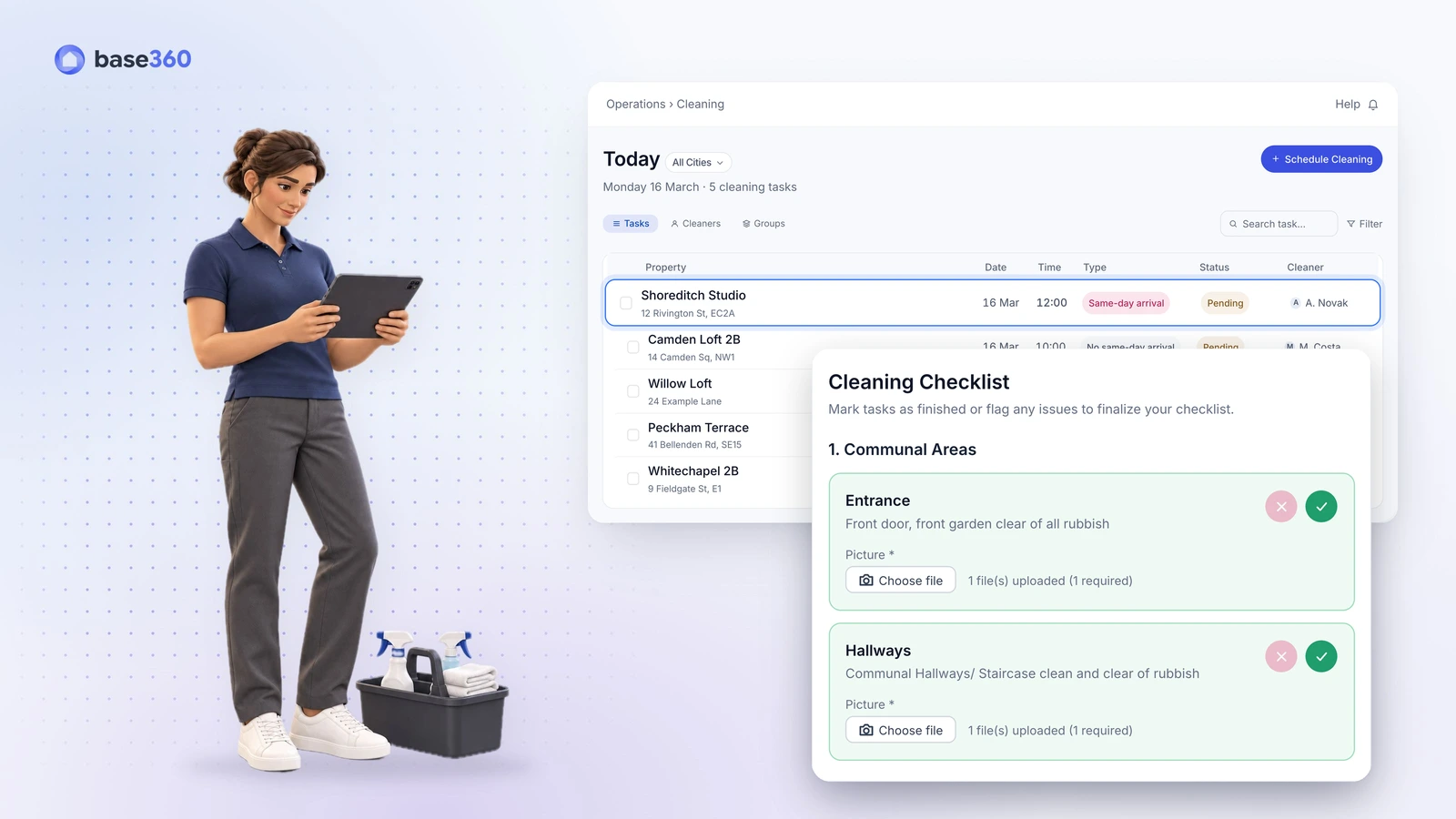
Monday, 07:30John Doe, the operations manager, opens today’s cleaning list. It has five cleans, already in the right order.
Every checkout becomes a clean
Your cleaning list builds itself from the day’s checkouts. When a guest books, Base360 already knows the day they leave, so it adds a clean for that day on its own, and nobody types it in. That’s why John Doe’s list has five cleans this Monday: five guests check out today.
This means you never keep a second calendar just for cleaning. You only look at the list. Most teams look at it the evening before, on the Tomorrow tab, because that’s when there’s still time to pick a cleaner for every job.
John, the operations manager, did exactly that on Sunday night. So on Monday morning, only one question is left: which clean should go first?
TipBase360 can assign cleaners on its own once you set the rules up. Until then, assign tomorrow’s cleans before you log off. A clean with no cleaner is easy to spot at night, and easy to miss in the morning rush.
Which clean goes first?
The one where a new guest arrives on the same day the last one leaves, because that flat has to be ready in a few hours. Base360 looks at the calendar, and if a new guest is arriving at the same flat on the same day, it marks the clean Same-day arrival and moves it to the top.
That label matters, because those cleans have no room for delay. The next guest is coming at three, and the flat has to be ready before they do.
Monday, 07:40Shoreditch Studio is at the top. A new guest arrives there at 15:00. John, the operations manager, gives it to Ana Novak.
The cleans without a same-day arrival can wait a little. If someone runs late there, no guest is left standing at the door.
TipIf one cleaner has two same-day cleans in a row, move one of them. Two tight windows back to back is how a guest ends up waiting.
Late checkouts without an early cleaner
A guest asks to leave at 12:00 instead of 10:00, and you say yes. But if nobody tells the cleaner, she still arrives at 10:00 and knocks on the door while the guest is packing. That’s why cleaners turn up during late checkouts: the checkout moved, but the clean kept its old time. In Base360 the clean is tied to the checkout, so when one moves, the other moves too.
That’s exactly what happened at Shoreditch Studio. Last night, the guest there bought a late checkout, from 10:00 to 12:00.
Base360 moved the clean’s time with the checkout. And because the cleaner’s job is linked to that clean, her time moved too.
Monday, 08:10Ana, the cleaner, sees 12:00 on her phone, not 10:00. Nobody had to call her, and she doesn’t arrive while the guest is still there.
You also decide who hears about changes like this, city by city. If a guest stays longer or changes the checkout time, the cleaner gets a WhatsApp and an e-mail telling them not to go today, or the new time to go. And if a guest leaves early or cancels, Base360 tells the cleaner the flat is free now, so the clean can happen sooner.
TipLate checkouts are easiest when guests buy them in the guest portal, because then the clean follows by itself. Our online check-in guide shows how to set that up.
Manual Check for no-shows and extensions
A late checkout is easy, because the answer is clear: clean later. Some changes aren’t that clear. For those, Base360 doesn’t guess. It shows a Manual Check instead of a clean, so a person can look first.
That happens after a no-show, or when a guest seems to extend under a slightly different name. In each case the question is the same: does this flat actually need a clean?
Monday, 08:20Willow Loft shows a Manual Check. Its booking now runs to 18 March, as if the guest had extended under a slightly different name. John, the operations manager, opens it and confirms the guest is staying, so nobody is sent today.
One small check like this saves a whole trip. And over a year, those trips add up to real money.
When a cleaner goes to a property now, it’s because it needs cleaning.
That’s what we found running our own short-term rentals on Base360. Manual Check is the reason we’ve got close to zero wasted cleans.
Cleaners scheduled without an app
Now the list is right, and it’s time for the cleaners to use it. Every checkout already made a clean, so the schedule builds itself, and cleaners don’t need an app to see it. Each cleaner gets their own personal link, and it opens in the browser on their phone.
Behind that link is everything they need for the day, so they don’t have to message you with questions.
Monday, 11:50Ana, the cleaner, opens her link. Her first job is Shoreditch Studio, from 12:00. She checks the access details: where the lockbox is, and its code. The job also says to bring one bed’s linen and two towel sets.
If you work with a cleaning company, the idea is the same. You add the company as an external user and put the flats they look after in a group. From then on, they only see the cleans for that group. So if you use two companies, neither one sees the other’s jobs.
Good to knowEach link belongs to one person. Send every cleaner their own link, never one shared link for the whole team.
Checklists with photo proof
Once the cleaner is inside, she starts the checklist. It walks her through the flat one item at a time, so nothing gets forgotten.
Some items only need a tick. Others need a photo, and those can’t be ticked until the photo is uploaded. That’s the part that pays off later, because a photo is proof the job was done.
Monday, 12:05Ana, the cleaner, works through the flat item by item. She photographs the made bed with its two towel sets, and at the end, the key back in the lockbox.
You write the checklist once, and you can change it per flat or per season. Just don’t ask for a photo of everything. Ask for the ones you might need in a dispute: the bed, the towels, the bathroom and the key.
When the cleaner finds a problem
Sometimes an item on the checklist isn’t fine. When that happens, the cleaner taps the cross instead of the tick. Base360 then asks for a photo and a short note, and turns it into a maintenance task.
Monday, 12:20One item asks for no visible damage to walls, doors or furniture. In the bathroom, there is some: water dripping from the ceiling above the shower. The cleaner taps the cross, takes a photo and writes “Leak in bathroom ceiling”. A maintenance task is open before she has even started cleaning.
There’s one more choice to make here: who pays for the repair. The cleaner can pick to be confirmed if they aren’t sure. Or they can pick guest if a guest clearly caused it. Here the cleaner picks to be confirmed, because a leak from the ceiling is nobody’s fault yet. Guest expenses are kept together, so they’re ready if you make a damage claim.
And if the cleaner fixes it on the spot, say by tightening a dripping tap, they just mark the task as no longer needed.
TipLet cleaners choose “to be confirmed” freely. Your team can decide who pays later. The photo is the one thing you can’t get back.
Overdue cleans and checklist reports
By the evening, the operations manager’s list looks the way it should. Every clean says Completed, except Willow Loft, where the guest stayed on, so its clean moved to 18 March.
If a clean had been missed, it would have moved to the Overdue tab, and Base360 would have flagged it in a pop-up the moment the operations manager opened the list. A clean there usually means nobody was assigned, or the checklist was never finished.
But the day’s work isn’t only useful today. Every past clean keeps its checklist and photos, and that’s what helps the operations manager two days later.
Wednesday, 10:15A guest at Shoreditch Studio says there were no towels. John, the operations manager, opens Monday’s checklist and finds the cleaner’s photo: two towel sets on the bed. He sends it to the guest, and the complaint ends there.
Cleaning is only one part of the stay. The Base360 walkthrough shows the rest, from the unified inbox to owner statements. The names and times here are examples.
Questions STR operators ask
What is cleaning management for short-term rentals?
Cleaning management for short-term rentals is the work of turning every checkout into a scheduled clean, putting the cleans in the right order, sending each one to a cleaner and checking that it was done. In Base360 the cleans come from the booking calendar, so nobody keeps a separate cleaning calendar by hand.
How does Base360 decide which clean comes first?
It checks the calendar for a guest arriving at the same property on the same day. Those cleans are marked Same-day arrival and go to the top of the list, so you can give them to your cleaners first.
What happens to the clean when a guest extends or buys a late checkout?
The change is flagged before a cleaner sets off. Base360 can send an WhatsApp, e-mail or SMS alert, such as Extension detected or Checkout time change, to the teammates you choose. With an AI workflow connected, Base360 texts the cleaning team the new time on its own. When a booking change is unclear, the clean becomes a Manual Check for your team to decide.
What is a Manual Check?
A Manual Check replaces a normal clean when a booking has changed in a way that needs a person: a cancellation during the stay, a no-show, an early checkout, or what looks like an extension under a slightly different name. Your team looks at the booking and the conversation and decides whether the property needs a clean at all.
Do cleaners need an app?
No. Each cleaner gets their own personal link. It opens in a phone browser and shows their jobs by day, the access details, the linen to bring and the checklist. The link belongs to that cleaner, so do not share one link across a team.
Can I give a cleaning company access to only some properties?
Yes. Add the company as an external user and put the properties they look after in a group. They only see the cleans for those properties, so two companies never see each other's jobs.
Can a checklist require photos?
Yes. Any checklist item can require a photo. The item cannot be ticked until the photo is uploaded, and the checklist cannot be submitted until the required items are done. The photos stay on the clean, so you can find them later.
What happens when a cleaner finds a problem?
The cleaner marks the item with a cross, adds a photo and a short note, and picks who pays: to be confirmed, or the guest if a guest caused it. Base360 opens a maintenance task for the property, or reopens a matching one. If the cleaner fixes it on the spot, they mark it as no longer needed.
How do I stop cleaners arriving during a late checkout?
Tie the clean to the checkout, not to a fixed time. In Base360, when a guest buys a late checkout, the clean moves to the new checkout time and so does the cleaner's job. If a guest extends, the cleaner is told on WhatsApp and by e-mail not to go that day.
Can I schedule cleaners automatically after each checkout without an app?
Yes. Base360 creates a clean from every checkout on Airbnb, Booking.com and your other channels, and same-day arrivals go to the top. Cleaners see their jobs through a personal link in the phone browser, so there is no app to install.