

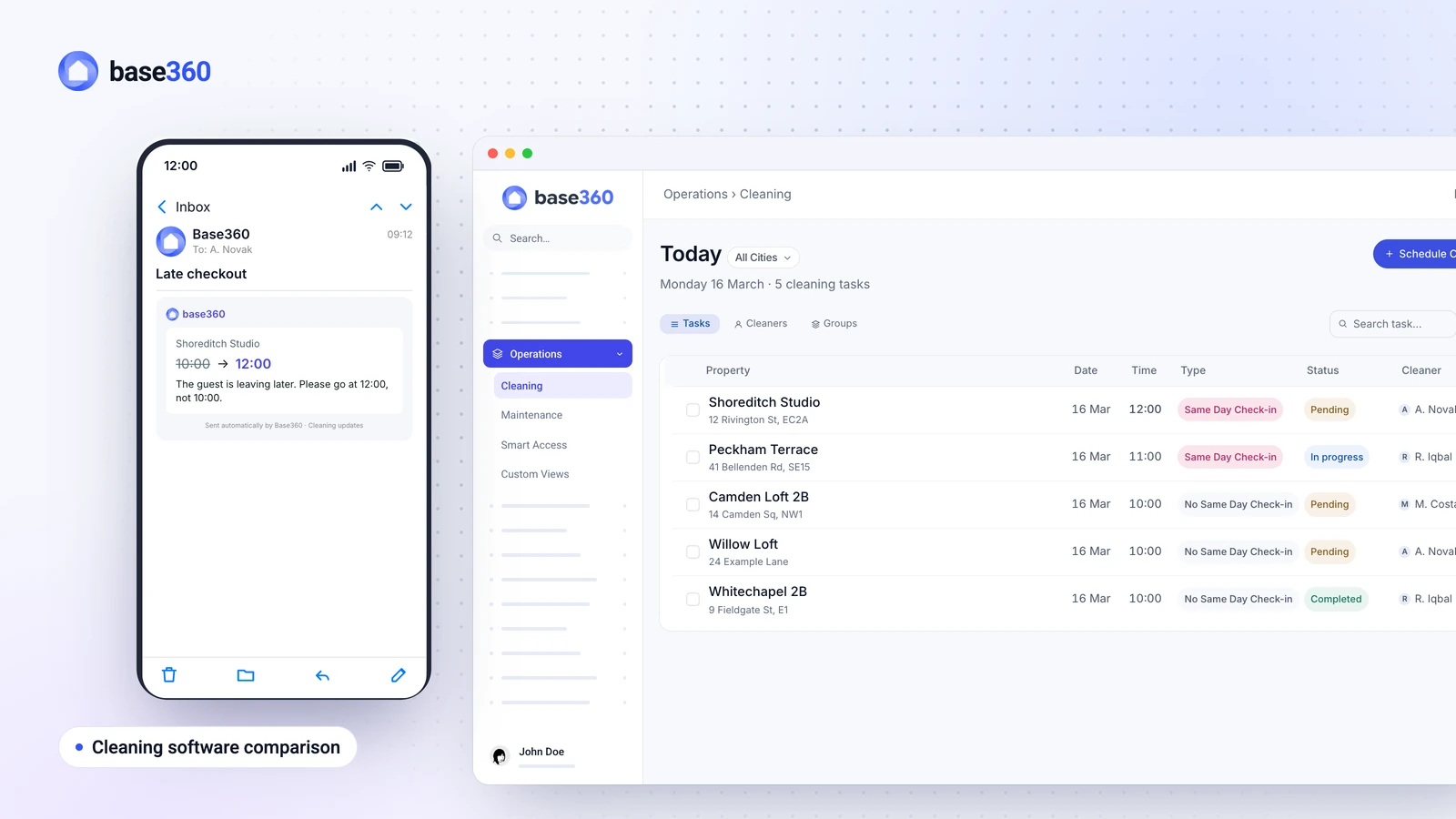
Base360 vs Turno at a glance
Both tools turn checkouts into cleans, send them to cleaners and ask for photo proof. The difference is where the cleaning plan gets its information, and that shows up in the jobs below.
| What you need | Turno | Base360 |
|---|---|---|
| The cleaner works to the real checkout time | Times are set per property, and a late checkout is changed by hand on that clean | The time comes from each booking, and a late checkout moves the clean |
| A last-minute booking isn’t missed | A booking that starts before the next sync may not import, and no clean is created | Bookings live in Base360’s own calendar, and a same-day clean goes to the top |
| Booking changes reach the cleaner | After the next calendar sync (every two hours with iCal), by app, e-mail or push | Straight away, by WhatsApp and e-mail, for new bookings, cancellations, shorter stays and extensions |
| The cleaner knows how many guests are coming | Only if your PMS sends it, and usually not with iCal | Beds and towel sets on every clean, from the booking |
| The cleaner knows each flat’s appliances | Notes are added to each checklist | Written once in the flat’s house manual, then shown in the matching checklist step |
| The cleaner can get in | Access notes in the job, or a smart lock integration | Instructions, the code, a lockbox photo and a video guide on every clean, once you’ve added them |
| The cleaner starts without an account | A Turno account, on the app or the website | A personal link, with no app and no login |
| A broken item becomes a repair | Cleaners report problems with photos | The same, plus repair tasks drafted from guest messages |
| Each step is proven with a photo | Yes, a photo can be required for each item | Yes, a photo can be required for each step |
Good to knowEvery Turno detail on this page comes from Turno’s own help centre and pricing page, checked on 5 October 2026. Turno changes its product too, so check the latest version before you decide. Turno is a trademark of its owner, and Base360 is not affiliated with Turno.
Common problems with Turno
Most cleaning mistakes don’t start with the cleaner. They start when the plan the cleaner works from falls behind the bookings. These six come up again and again.
- Your cleaner works to the wrong checkout time. A guest pays extra for a late checkout until 12:00. The cleaner still arrives at 10:00 and knocks while they are packing. In Turno, check-in and checkout times are set per property rather than taken from each booking, so a late checkout means editing that clean by hand (Turno help).
- A last-minute booking can miss the cleaner. At 13:30 a guest books the flat for a 15:00 check-in, and the cleaner’s list still shows an ordinary turnover. Turno’s help centre says a booking that starts before the next calendar sync may not be picked up, and then no cleaning job is created for it. An iCal calendar syncs every two hours, and an integration can take up to six, so for a booking like this you have to sync by hand or add the clean yourself (Turno help). Turno tags same-day turnovers on its own once the new booking is in (same-day tag).
- Your cleaner doesn’t know how many guests are coming. Four guests arrive, and the cleaner made up one bed and left two towels. Turno knows the guest count when your PMS sends it. With an iCal sync it usually doesn’t, and Turno suggests adding it to the job as a note by hand (Turno help).
- Your cleaner calls you about the coffee machine. Every flat has a different coffee machine, oven, heater and bin day, and a new cleaner calls the office from each one. In Turno, appliance instructions are added by hand to a checklist, as items or images (Turno help).
- A guest reports a broken heater and nobody turns it into a job. The message arrives at 21:00. By the time someone reads it, the next guest is already complaining. In Turno, a problem is reported by hand, by the cleaner or by you, so someone has to read the guest’s message and report it (Turno help).
- You pay for two systems and keep them in step. Bookings sit in one tool and cleans in another, so every new flat has to be linked twice. With your own cleaners on two or more properties, Turno costs $10 per property per month, or $96 per property a year, on top of your PMS, plus card or bank fees if you pay cleaners through Turno. With some PMS partners you may be eligible for a free Turno subscription (Turno pricing, fees, checked 5 October 2026).
Most of these come from the same gap: the cleaning plan sits in one system and the bookings sit in another.
How Base360 solves Turno’s six problems
Base360 closes that gap by planning every clean from the booking itself, so a change to the booking changes the clean. Here is what that means for each problem:
- Checkout times and booking changes: the clean takes its time from the booking, so a late checkout moves it, and the cleaner hears about every change straight away by WhatsApp and e-mail.
- Last-minute bookings: bookings come into Base360 through its connection to Airbnb, Booking.com and your other channels, not through a calendar feed that refreshes every few hours. When a guest books for today and the flat has a checkout that day, that clean goes to the top of the list as a same-day turnover.
- Guest count: the number of guests comes from the booking, so each clean shows how many beds and towel sets to prepare without anyone typing it in.
- Appliances and access: you write each flat’s appliance notes once, and they appear in the matching checklist step on every clean, along with how to get in.
- Guest-reported problems: when a guest reports a problem in a message, Base360’s AI drafts a repair task for your team to approve.
- One system: bookings, cleaning and maintenance sit together, so there is no separate cleaning tool on top of your PMS and no second calendar to link.
The sections below show how each one works.
Cleans timed to the checkout
Base360 creates a clean from every checkout, and the time comes from that booking rather than from a fixed setting for the property. So when a guest pays extra for a late checkout until 12:00, the clean moves to 12:00 too. The same happens when you agree a late checkout with the guest in a message: the booking’s checkout time changes, and the clean moves with it. The cleaner sees when the flat is actually free and doesn’t arrive while the guest is still there, and nobody edits the clean by hand.
Same-day turnovers go first
Bookings live in Base360’s own calendar, which is the calendar the cleaning list is built from. So a booking made on the day arrives like any other booking, without waiting for a calendar feed to refresh. When the new guest arrives on the same day as a checkout, the clean is marked as a same-day turnover and goes to the top of the list, so the cleaner does it first, ahead of the afternoon check-in. The cleaner hears about the new clean straight away by WhatsApp and e-mail.
Booking changes reach the cleaner
When a booking is made, cancelled, shortened or extended, Base360 tells the cleaner straight away by WhatsApp and e-mail, so nobody finds out at the door. A cancelled booking takes its clean off the list, and if a new guest books the same flat, the clean comes back for the new booking.
When a guest extends, the clean moves to the new checkout day and waits for your team to confirm it, so no cleaner is sent while the guest is staying on. You choose who on your team gets these alerts.
Beds and towels from the guest count
The guest count is set when the guest books and sits on the reservation. Each clean shows the cleaner how many beds and towel sets to prepare, so nobody types it in and the flat is ready for the number of guests who are actually coming.
The house manual in the checklist
You write each flat’s house manual once. Base360 brings the right appliance notes into the matching checklist step on every clean, and the cleaner checks that each appliance works. So a new cleaner learns the coffee machine from the checklist, not from a phone call.
How to get in comes with every clean too: the instructions, the code, a photo of the lockbox and a video guide, once you’ve added them for the flat. So the cleaner doesn’t call you from the doorstep either.
Guest messages become repairs
Base360’s AI reads guest messages, and when one reports a problem, such as a heater that won’t turn on, it drafts a repair task for that property. Your team approves it, then plans the visit, tracks the status and records who pays for the repair. So a reported problem becomes a task without anyone copying it out of the conversation.
Cleaners report problems on the checklist as well, with a photo and a short note, and Base360 turns each one into a maintenance task, or adds it to a matching open one.
One system instead of two
Base360 isn’t a cleaning app you add to your current PMS. It replaces the PMS and the cleaning tool together, so your bookings, guest messages, property owners, cleaning and maintenance sit in one system. That means you don’t pay for a cleaning tool on top of your PMS, and there is no second calendar to link each time you add a flat.
Switching is the part operators worry about, and you don’t do it alone: our team and the AI guide you through it. The questions below explain how.
We run our own short-term rentals this way, with our own cleaning team, and see each day how many cleans every cleaner has and how many are done.
Cleaning is only one part of the stay. The Base360 walkthrough shows the rest, from the unified inbox to owner statements.
What works the same as Turno
If you are moving from Turno, the everyday basics are there. Each property has its own checklist, and any step can require a photo, so you keep proof of every clean.
The Cleaning & Maintenance page shows the cleaning features in full, and our guide to six short-term rental cleaning problems walks through the problems in more detail.
When Turno is the better fit
Turno is built around a marketplace. If you need to find cleaners, it lists more than 126,000 of them and handles their payment (Turno pricing).
Base360 suits operators who already have their own cleaners or a cleaning company and want the cleaning plan to follow every booking.
Questions operators ask
Is Base360 a good Turno alternative?
Yes, for short-term and vacation rental operators with their own cleaning team. Base360 is a property management system for short-term rentals with cleaning and maintenance built in, so cleans are planned from each booking instead of from a calendar sync. It doesn’t offer a marketplace for finding cleaners.
Does Base360 have photo checklists like Turno?
Yes. Each property has its own checklist, and any step can require a photo. The step can’t be ticked until the photo is in, and every finished clean keeps its checklist and photos.
Do my cleaners need to install an app?
No. Each cleaner gets their own personal link that opens in the phone browser, with no app and no login. It shows their cleans, when the flat is free, the beds and towels to prepare, how to get in and the checklist.
How do bookings from Airbnb and Booking.com reach the cleaning list?
Base360 connects to Airbnb, Booking.com, Expedia, Vrbo and other channels, so bookings arrive in Base360’s own calendar with their checkout times and guest counts. Every checkout becomes a clean on the cleaning list.
How do I switch from Turno to Base360?
You connect your channels, such as Airbnb and Booking.com, which brings in your future bookings and your Airbnb listings, and you upload your documents and write each flat’s house manual. Then you tell the AI what you want to set up, and it prepares the steps and follows up with you until it’s done. Our team helps throughout the move.
How much does Turno cost?
Turno is free for one property, or if you only use cleaners from its marketplace. With your own cleaners on two or more properties, it costs $10 per property per month, or $96 per property a year, plus payment fees when you pay cleaners through Turno (Turno pricing). With some property management systems you may be eligible for a free Turno subscription through a partnership. We checked these prices on 5 October 2026.
Can guests report problems in the property?
Yes. When a guest reports a problem in a message, Base360’s AI drafts a repair task for that property. Your team approves it, plans the visit and tracks it until the repair is done.