


What Base360 is
Base360 runs your short-term rentals from one place, and AI autopilot handles the routine work. Bookings, guest messages, cleaning, owner statements and prices all live in one system.
We didn't set out to build software. We ran The Flex, a rental business in London, and as it grew our tools couldn't keep up. So we built our own, and in 2025 we opened it to other operators.
This guide follows the order your day runs in: bookings come in, guests write, the AI answers, and the rest of the work follows. Each chapter shows the screen, the steps and one tip.
Channel management
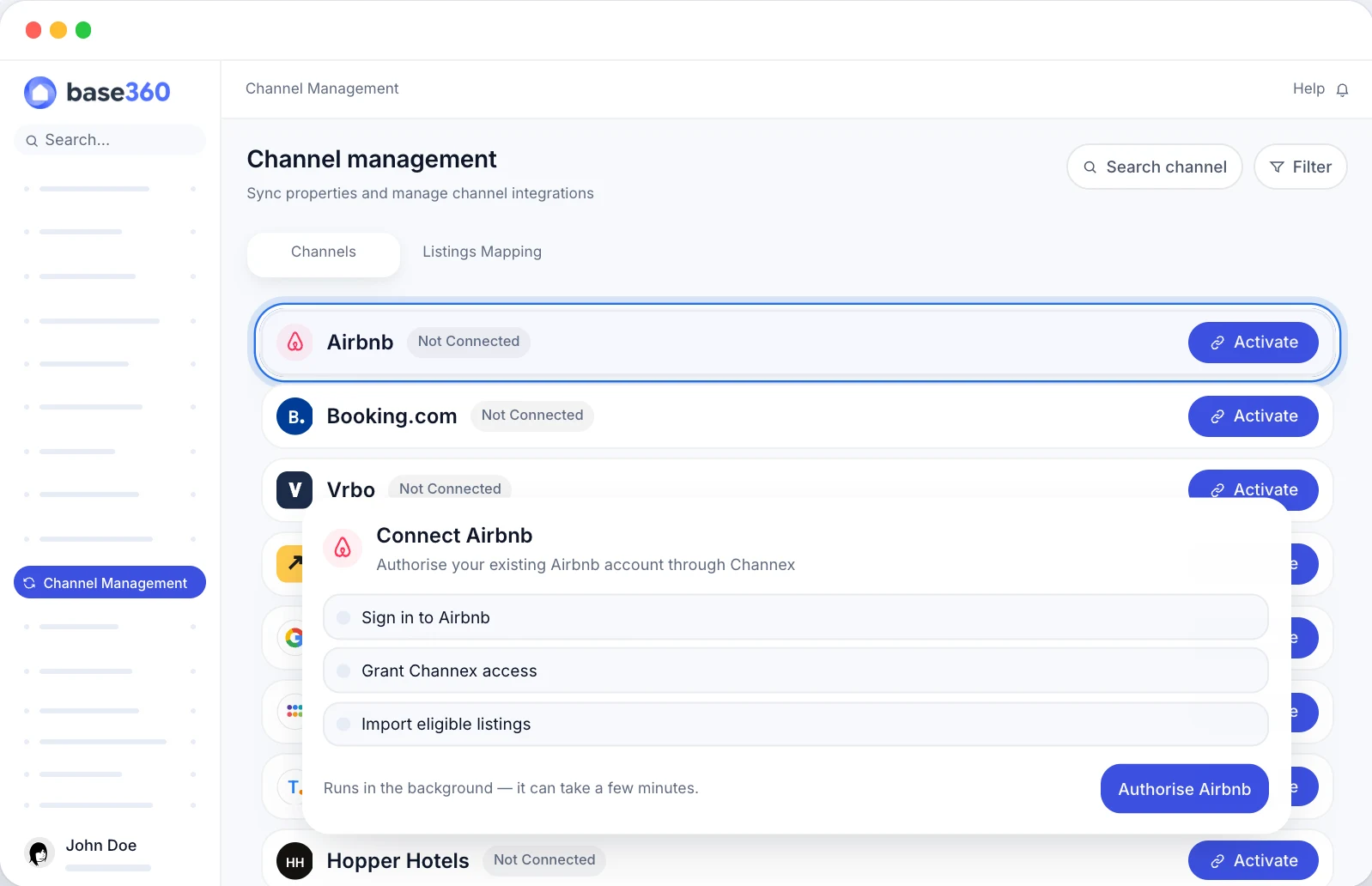
Let's start with your channels, because everything else follows from them. Base360 connects to Airbnb, Booking.com and 130+ more, so you sell where your guests already book. Once a channel is connected, your listings and bookings come into Base360, and your rates and availability go back out. Ten channels have their own setup card; the rest are opened on request.
- Go to Channel management.
- Click Activate next to Airbnb.
- Sign in to Airbnb. Your listings come in on their own, no re-typing.
- Do the same for Booking.com and your other channels.
- Open Listings Mapping and turn each listing on where you want it to sell.
From here on, every booking lands in your calendar, every guest message lands in your inbox and every checkout becomes a clean. Let's look at the inbox first, because that's where guests will find you.
TipGreen means live. Red means the channel hasn't accepted that listing yet, so check it first.
Unified inbox

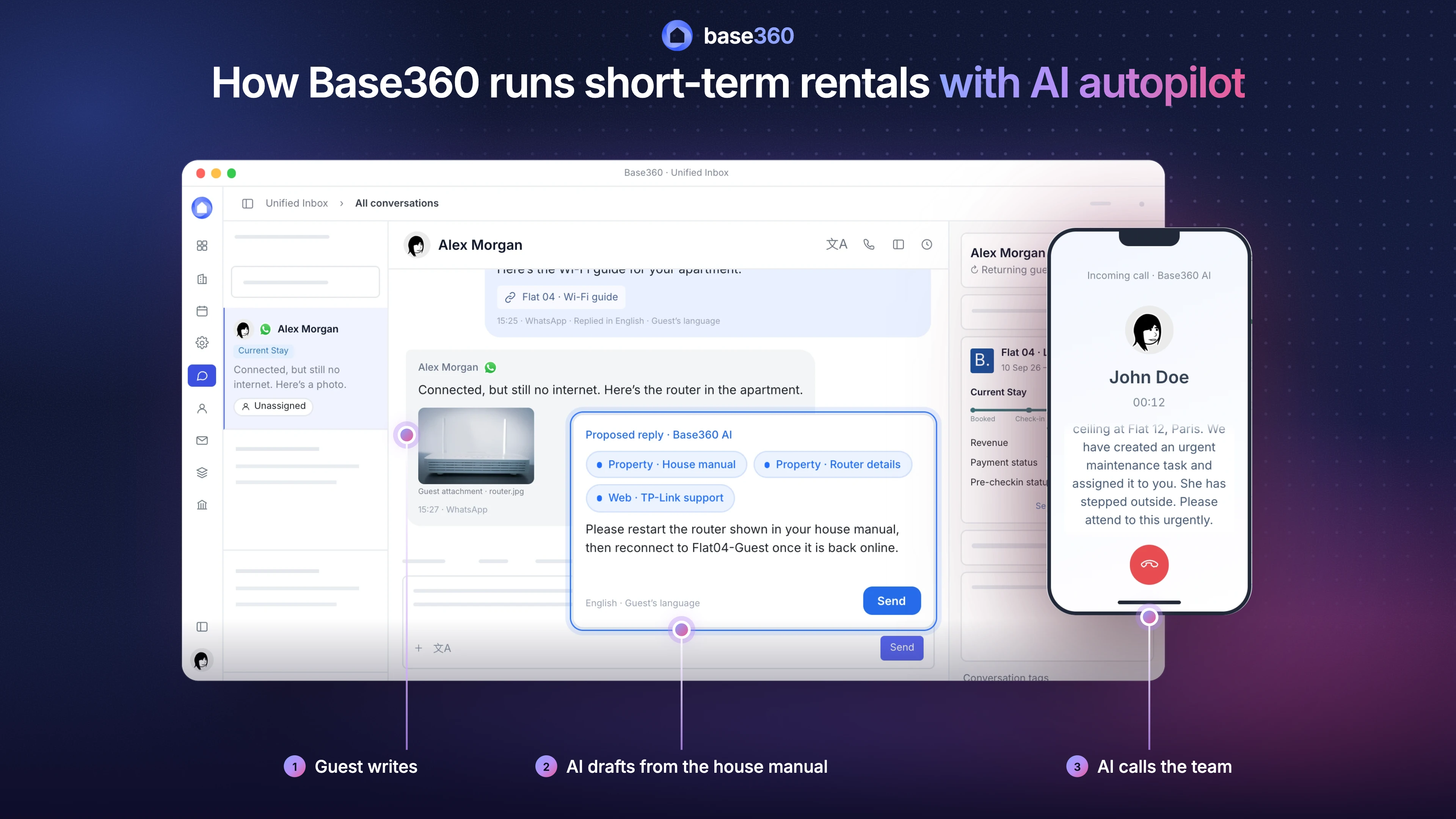
Now bookings are coming in, and guests will start messaging you. This is where AI autopilot starts earning its name. Every message lands here, whether it's from Airbnb, Booking.com, WhatsApp, SMS, email, Instagram or a phone call, and the AI replies in the guest's language. Before you answer, you see the booking, the arrival status and a summary of the conversation so far.
- Go to Unified inbox and open a conversation.
- Read the reply the AI has drafted for you. It writes it from your house manual, your knowledge base and the booking: dates, property, what the guest paid for.
- Edit it if you like, then click Send. Something urgent, like a leak? The AI tags it and brings the right person in.
The draft is only as good as what the AI knows about your flats. That's why the next step is your properties.
TipKeep the AI in draft mode for your first two weeks. Once you trust its answers, let it send the easy ones. The unified inbox guide shows which.
Properties

The AI writes better replies when it knows your flats. So next, fill in your properties. You answer each question once, and every module uses it.
- Go to Properties and open a property.
- Add the details: amenities and beds.
- Add the check-in instructions: address, a video of the way in, the door code. Base360 turns them into a step-by-step guide and a PDF for guests.
- Fill in the house manual: Wi-Fi, heating, the fridge model, anything guests ask about. One manual for guests, one for your team and cleaners.
This one record feeds the rest of Base360. The inbox AI reads the house manual, pre-arrival sends the check-in instructions, and cleaners see the access details on their link.
TipDo the house manual before you turn the AI on. It's where the AI finds its answers.
Calendar and reservations
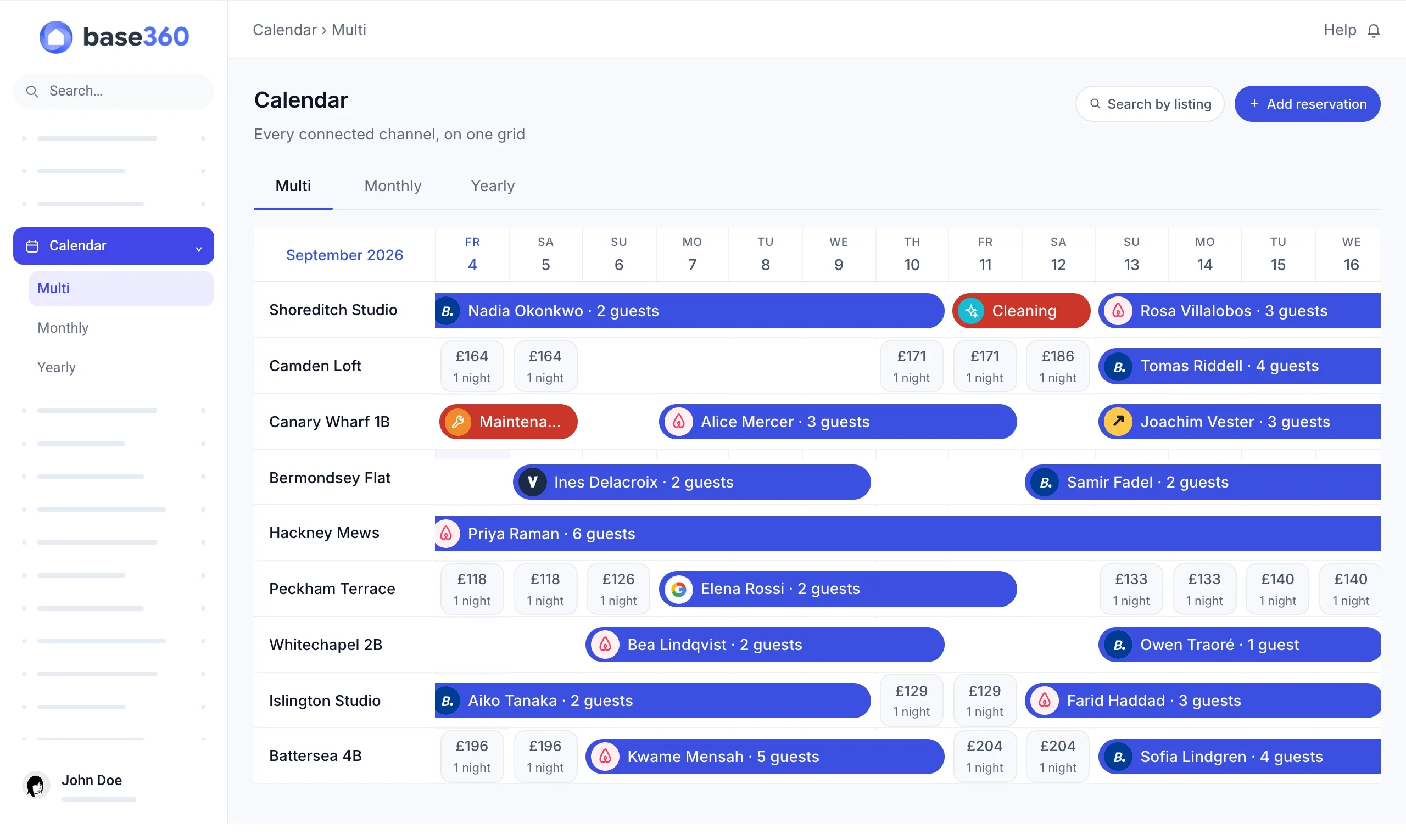
With channels and properties in, your calendar fills up on its own. It shows every booking from every channel in one place, with a full reservation view for your team: guest, payment, notes and the pre-arrival status.
- Go to Calendar.
- Click a booking to see the guest's details, their ID and what they paid for.
Good to knowYou didn't type those details in. The guest did, through pre-arrival. That's next.
Pre-arrival and upsells
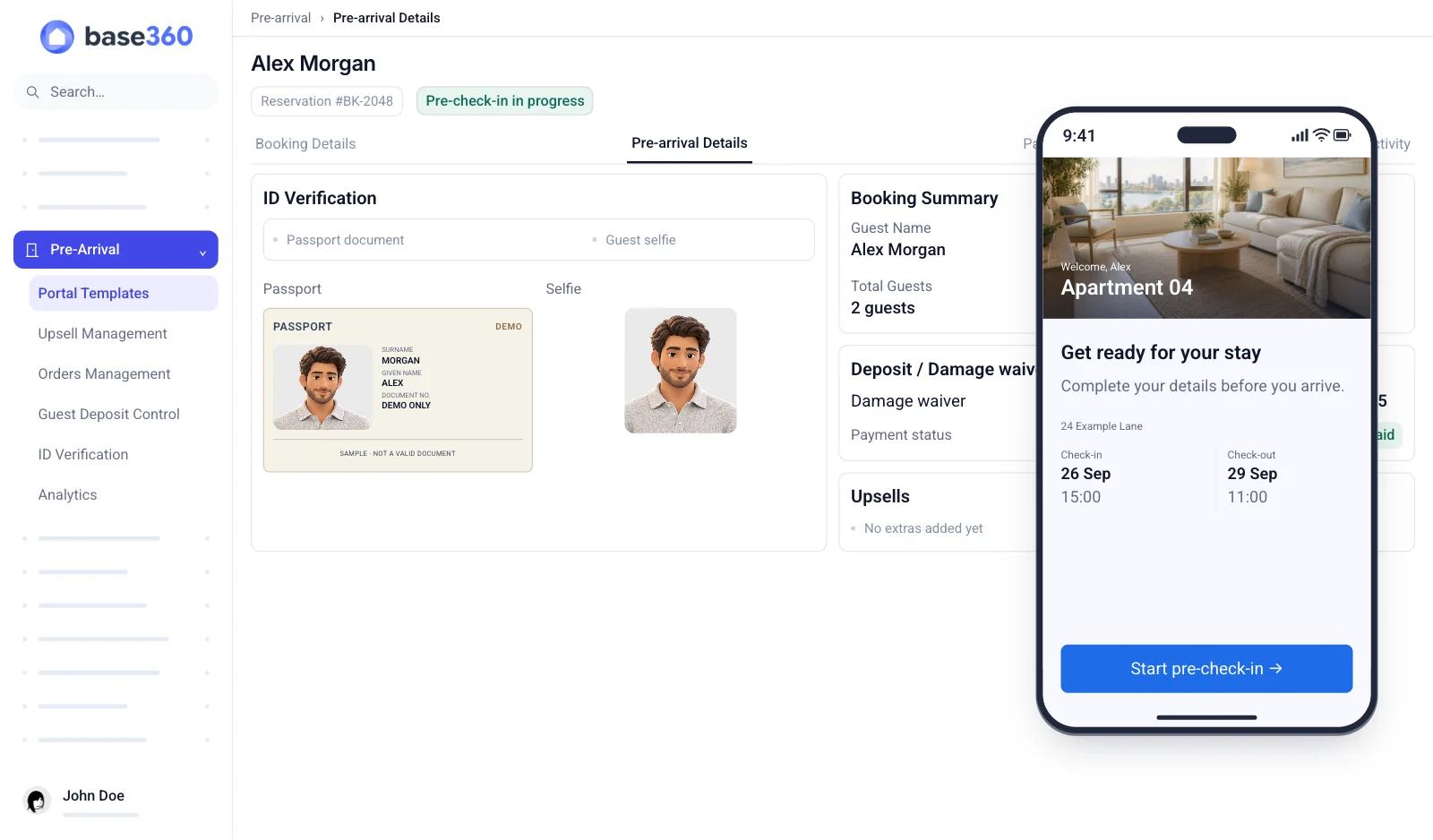
Pre-arrival is the link every guest gets when they book. They fill in their details, upload an ID and a selfie that Base360 checks against it, pick a damage waiver or deposit, and can buy extras like early check-in, late checkout, parking or an airport transfer. Then they get the arrival guide: the address, the key pickup and the door code, on the day.
- Go to Pre-arrival and create a template, or start from one of ours.
- Pick the steps you want guests to complete.
- Assign the template to your properties. New bookings get the link from now on.
Everything the guest fills in lands on their booking in the calendar. If they buy a late checkout, the clean moves with it. And their email and phone go into your contacts, which is what the next part is about.
TipStart with the damage waiver on direct bookings. The online check-in guide walks you through the rest.
Repeat marketing

Pre-arrival gives you each guest's email and phone, with their consent, so the more guests complete it, the bigger your list. Use it to bring guests back with an offer, and track the campaign through to bookings.
- Choose who gets it, for example your returning guests or everyone who stayed in Paris.
- Write the offer as an email, SMS or WhatsApp template, for example 10% off with a return code.
- Send it now, or schedule it weekly or monthly.
- The guest gets the offer, and you track the campaign through to bookings.
TipGuests who come back book direct, so you pay no channel commission.
Finance and owner statements
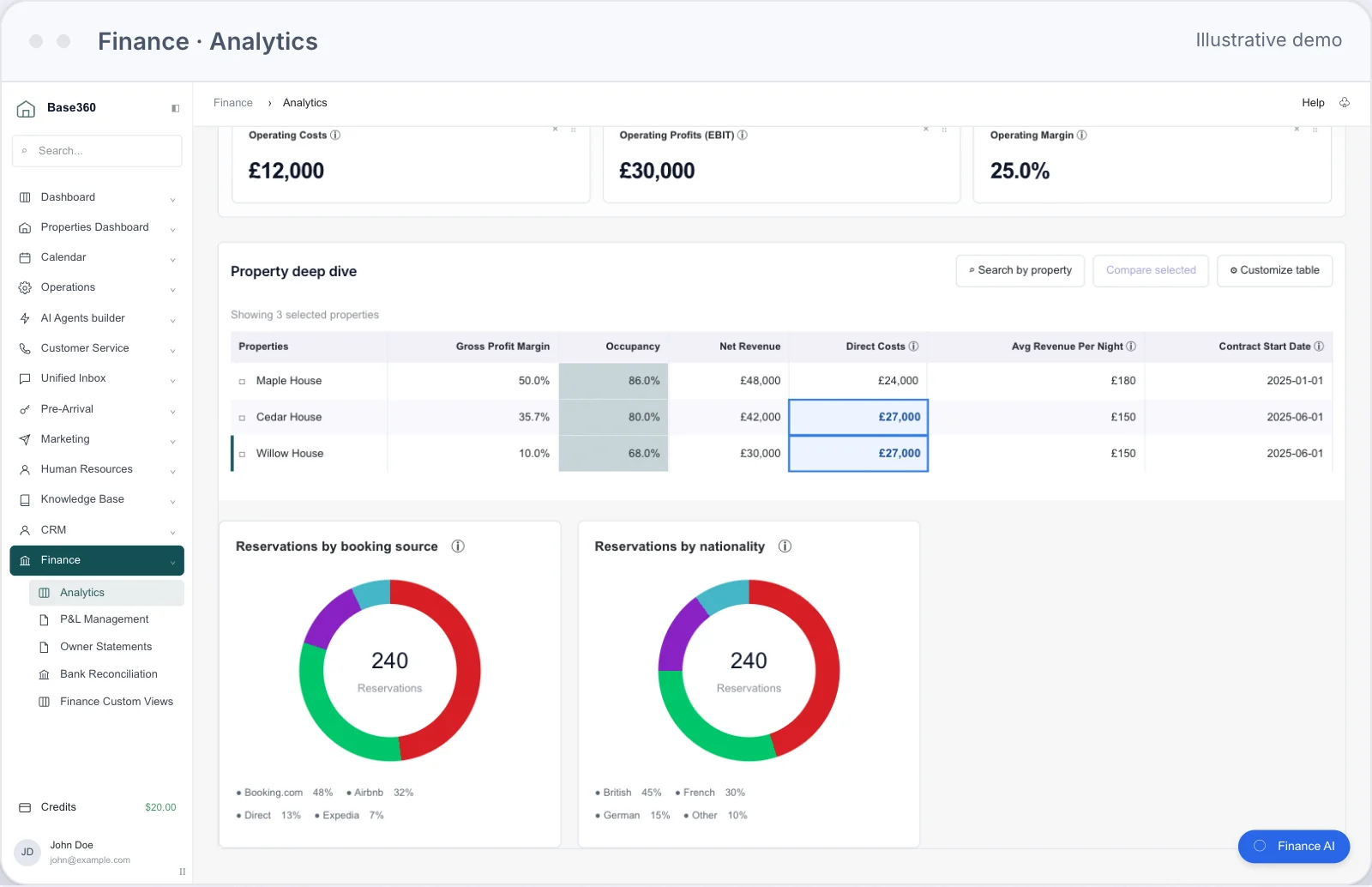
By now money is coming in from several places: bookings from every channel, extras sold in pre-arrival, direct bookings from your campaigns. Finance adds it all up and shows what's left after costs: revenue, margin and booking sources, by property, city and month. You can ask it questions in plain English, like "which property has the lowest margin?"
- Go to Finance and pick a city and a month.
- Check revenue, costs and where bookings came from.
- If you manage flats for owners, open Owner statements. Check each draft, publish it and send the PDF.
Good to knowBase360 works out what the owner is owed. Paying them stays with you and your bank.
Cleaning and maintenance
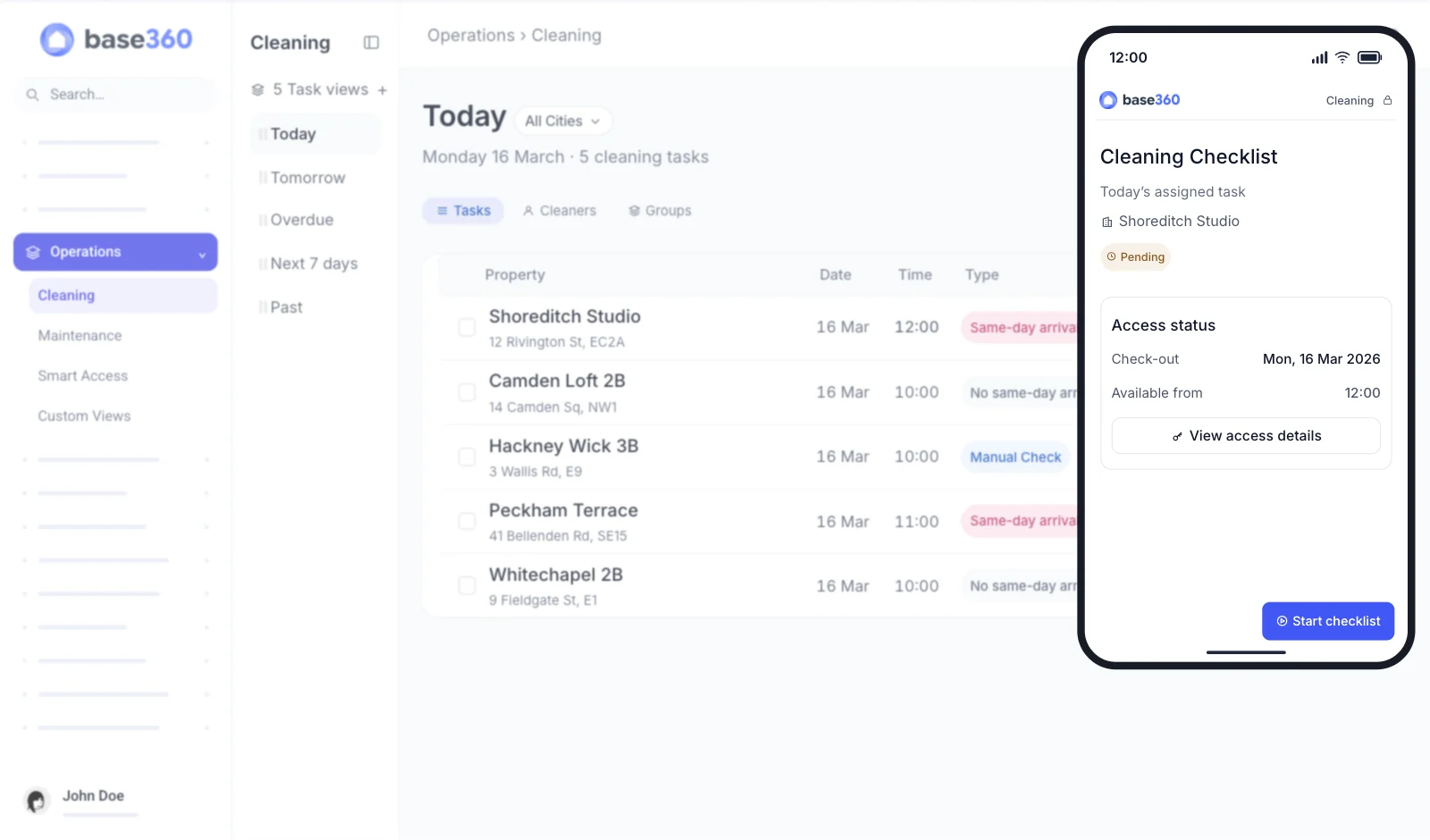
Every checkout in your calendar needs a clean. Base360 creates it from the booking, moves it when the booking changes and marks the late checkouts. No cleaning calendar to keep by hand.
- Go to Cleaning and look at today's list.
- Assign each clean to a cleaner.
- Send the cleaner their personal link. It opens on their phone, no app needed.
- When they're done, check the checklist and timestamped photos. Spot damage? Send it to maintenance in one click, and the cost can go on the owner's statement.
Telling the cleaner about a late checkout is the kind of small job that eats a morning. That's what AI agents are for.
TipAsk cleaners for a photo of every room. It settles most damage questions before they start.
AI agents
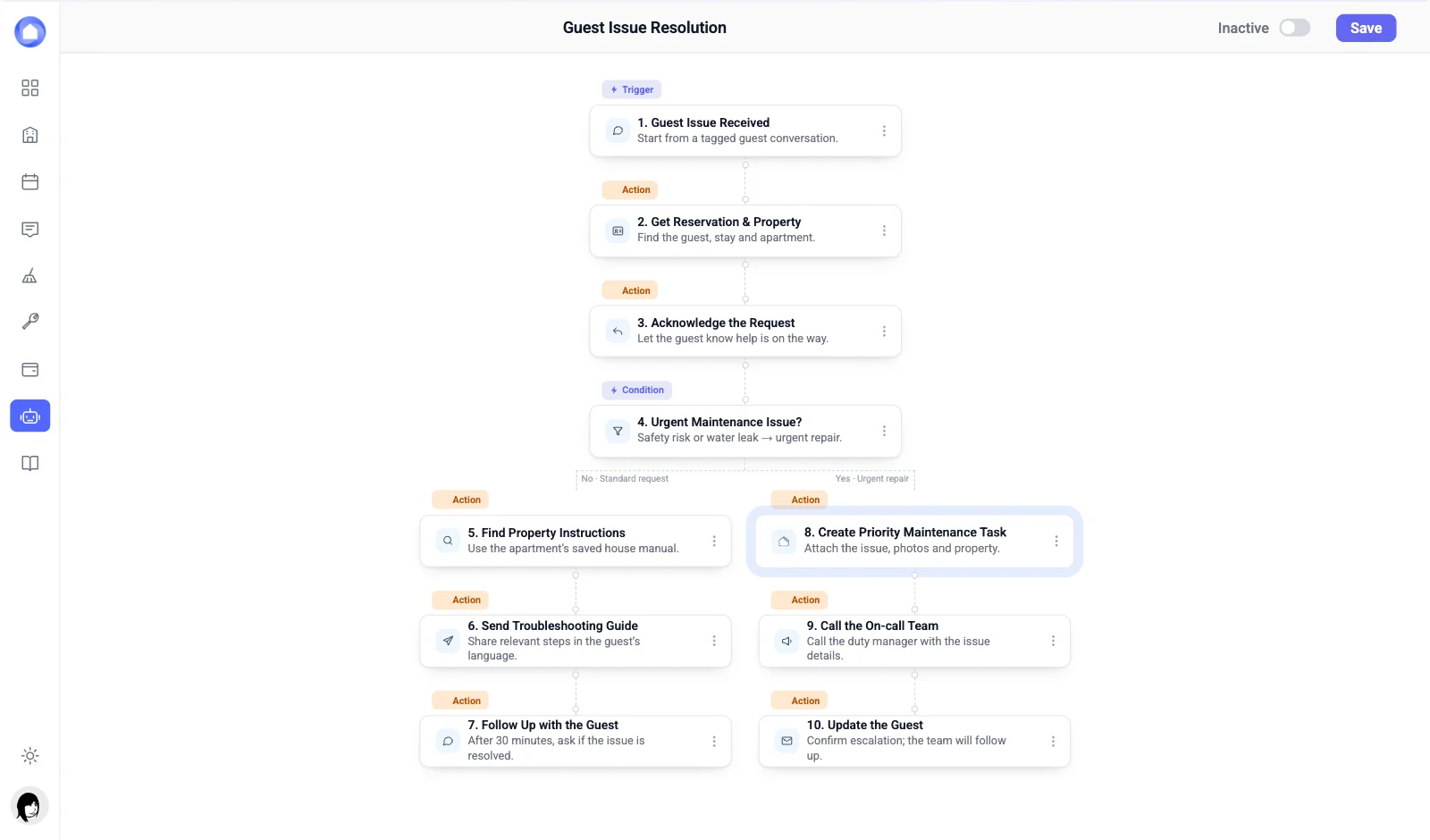
Some jobs repeat every day, like approving an early check-in or chasing a guest who hasn't checked in. An AI agent does them for you, working from the bookings, pre-arrival status and property details already in Base360. This is the autopilot part of AI autopilot: the inbox AI answers when a guest writes, agents act on their own when something changes.
- Go to AI agents and pick a template, like the pre-check-in reminder.
- Change one thing, for example how many days before arrival it sends.
- Switch it to Active. It sends through the inbox, so every message stays in the guest's conversation.
TipChange one thing at a time. It's the easiest way to get your first agent working.
Pricing with Claude
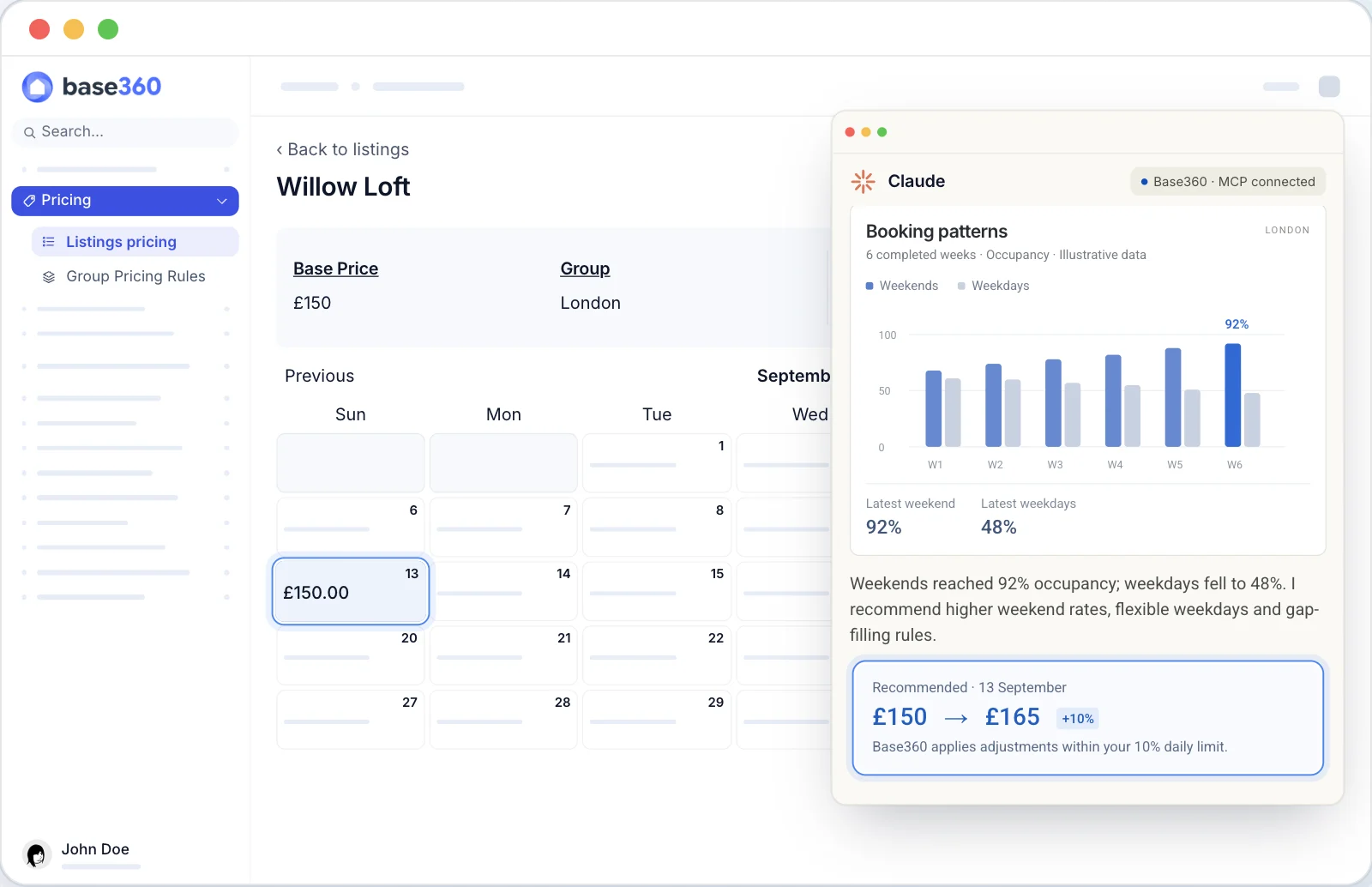
Your prices follow rules you set: seasons, events, minimum stays and how full you are, all within a daily limit you choose. They go out to every connected channel, and Finance shows what they earned. Claude can review them for you through MCP, a connection that lets Claude work with your Base360 data, and write the changes back into your rules. So even pricing runs on autopilot, with you approving the changes.
- Go to Pricing and set your rules.
- Ask Claude to review one city or one month.
- Approve the changes you like.
TipAsk Claude for last year's sold-out dates first. Those are worth a look for a higher rate.
Team, knowledge base and AI assistant
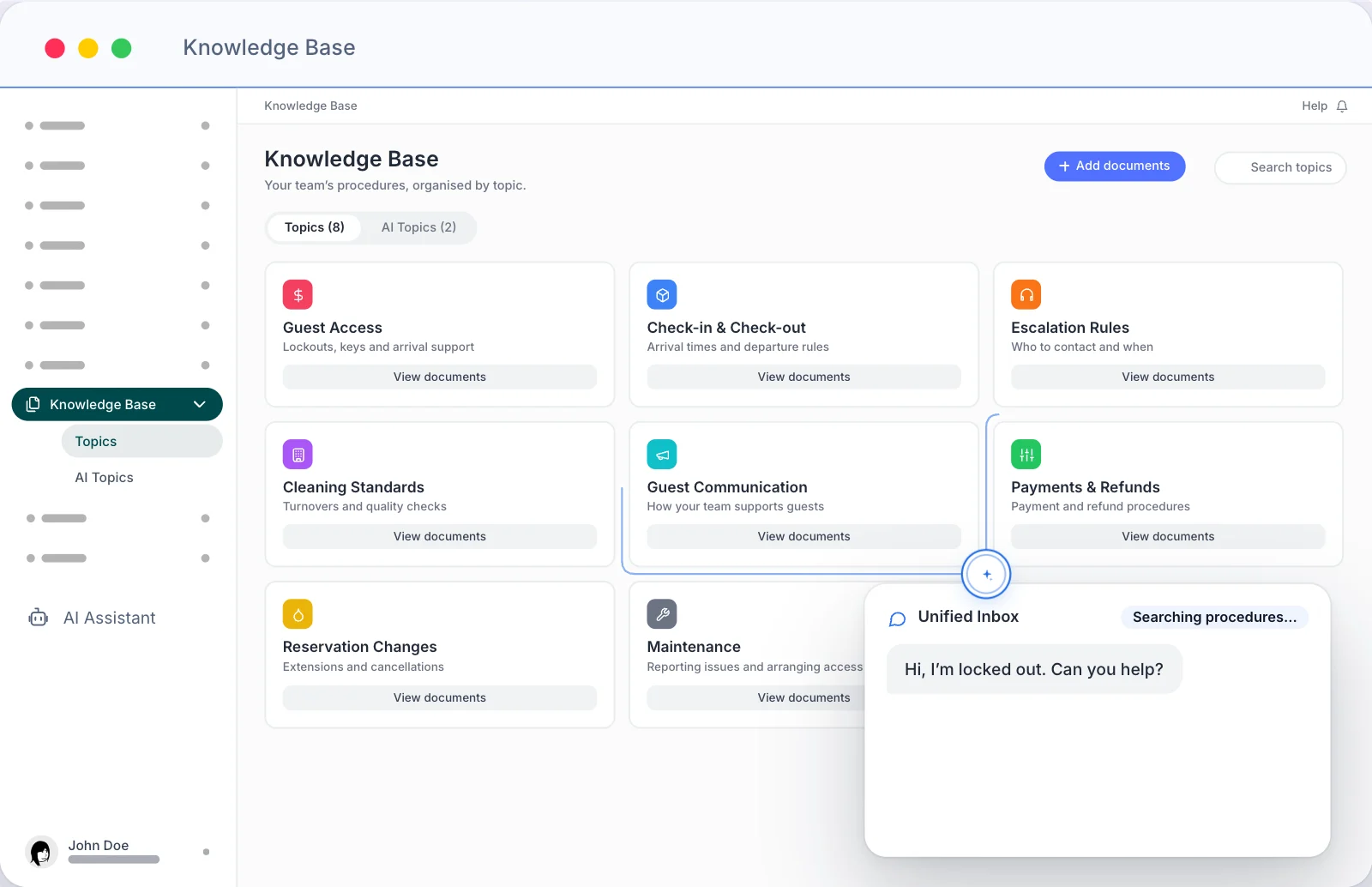
Last, your team. Keep their contracts, documents and time off in one place, and write down how you do things, so the AI can answer from it instead of a script.
- Go to Human resources to add your team and approve holiday requests.
- Go to Knowledge base and write your processes. The house manual is how each flat works; this is how your team works.
- Your team can ask the AI assistant questions, like "how do I handle a lockout?". It answers from the knowledge base and cites the source. The inbox AI reads it too when it drafts replies to guests.
TipWrite the knowledge base like you're briefing a new hire on day one.
Questions STR operators ask
What is Base360?
Base360 is a property management system for short-term rentals. It connects your booking channels, puts guest messages and calls in one inbox, holds your properties, calendar, pre-arrival, cleaning, maintenance, finance and team in one place, and runs AI agents on the repetitive work. The 12-minute video on this page walks through each part.
What does AI autopilot mean in Base360?
AI autopilot means the AI does the routine work and you check it. In Base360 that covers four things: the inbox AI drafts a reply to every guest message from your house manual, knowledge base and the booking; AI agents run workflows on their own, such as check-in reminders, early check-in approvals and telling the cleaner about a late checkout; Claude reviews and writes your pricing rules through MCP; and an AI assistant answers your team's questions from your procedures. You choose what sends on its own and what waits for a person.
Which booking channels can Base360 connect?
Ten channels are built in, including Airbnb, Booking.com, Expedia, Vrbo and Google, and 130+ more can be opened on request. Listings, rates and availability are mapped per channel from the Channel management screen.
Does the AI reply to guests on its own?
You choose. The AI reads each message and drafts a reply from your house manuals, your knowledge base and the booking. You can send that draft yourself, or set the AI to send on its own. When it cannot answer, it hands the conversation to a person.
Do cleaners and maintenance staff need an app?
No. Each cleaner and each maintenance person gets their own link. It opens in a phone browser and shows their jobs for the day, the access details and the checklist. Photos they take are timestamped and appear on your dashboard.
How do guests check in with Base360?
After booking, the guest gets a pre-check-in link. They add their details, an ID and a selfie if you ask for them, pay a damage waiver or deposit, and can buy extras such as a late checkout. Once the steps are done, the same link shows the check-in instructions and the door code at the time you set.
Does Base360 pay property owners automatically?
No. For properties under a management agreement, Base360 creates the monthly owner statement from the contract, with the management fee, cleaning fee and VAT. You check it, publish it and send the PDF. Moving the money stays with you and your bank.
Can Claude change my prices in Base360?
Yes. Through an MCP connection, Claude can read your listings' performance in Base360, recommend changes, and write seasonal, event and occupancy-based adjustments back into your pricing rules.
Does Base360 work for both leased and managed properties?
Yes. Each property records whether you lease it or manage it for an owner. Leased properties carry the landlord contract, rent and timeline. Managed properties carry the management agreement, and that is where owner statements come from.