
Claude MCP for short-term rentals
Ask your PMS, approve the change.
Ask Claude about your rentals and it answers from Base360. Approve a change and Claude makes it.

Made by The Flex, a rental company.
Our revenue team uses it.
What is the Base360 MCP server?
Your PMS, inside Claude
MCP (Model Context Protocol) is how AI assistants connect to other software. Ours connects Claude to Base360, so it can read your data and make the changes you approve.
- 1OnceConnectAdd Base360 to Claude with one link and choose what it may do.
- One connector URL
- Works with Claude, ChatGPT, Codex and Cursor
- Sees only what you can see
- 2When you askAskClaude reads your Base360 data and answers with your numbers.
- Portfolio, prices and finance
- Arrivals, guests and owners
- Every Base360 lookup shown
- 3When you allow itActClaude creates properties and changes prices in Base360 after you approve.
- Properties from a spreadsheet
- Price changes you approve
- Pricing strategy from your booking history
Connect · once, in a minutePart 1 of 3
Connect Base360 to Claude
1One link
Add Base360 as a connector
Copy the connector URL from AI Connections in your Base360 settings, add it to Claude as a custom connector and sign in to Base360. There is no API key or code to write.
Any MCP clientChatGPT, Codex and Cursor connect with the same link.
2Permissions
Choose what Claude may see and change
Base360 asks what Claude may read and whether it may create properties and change prices. Claude works inside your own Base360 access, so it never sees more than you can.
Your team, your accessEach person connects with their own login and their own permissions.
Ask · answers from your own dataPart 2 of 3
Ask about your business in plain words
3Portfolio review
See how every listing is doing
Ask how your listings are doing. Claude reads your listings, reservations and occupancy in Base360, answers with your own numbers and draws a chart when it helps.
Every lookup shownClaude lists each Base360 tool it used, so you can check where a number came from.
4Opportunities
Find revenue opportunities
Ask where you are losing money. Claude reads your prices next to your finance, says what each finding means and what to change first.
Ask the next questionAsk why a listing earned less, or tell Claude to fix the prices.
5Arrivals
Check tomorrow’s arrivals in one question
Ask what needs doing before guests arrive. Claude reads your reservations, cleaning tasks, ID checks and lockboxes in Base360 and lists only what still needs a person.
Then act in Base360Assign the clean in cleaning and maintenance or send the access code from pre-arrival.
6Guests
See which guests are waiting for you
Ask who still needs an answer. Claude reads your unified inbox and reviews across Airbnb, Booking.com and WhatsApp, and tells you who has waited longest and why.
Reply in one inboxAnswer each guest from the unified inbox, with the whole conversation next to the booking.
7Owners and leads
Follow owner statements and landlord leads
Ask where the month stands with your owners. Claude reads your owner statements and CRM leads, and lists the drafts to finish and the leads nobody has called.
Every lead in one pipelineCall and track landlords in the CRM, where Claude reads them from.
Act · when you allow itPart 3 of 3
Make changes by asking Claude
8Add properties
Create properties from a spreadsheet
Share your property list with Claude. It creates the property records and house manuals in Base360, with your approval.
Only what you allowAllow it once, keep the permission or deny it. New homes appear in your properties dashboard.
9Price changes
Change prices with your approval
Tell Claude what to change. It shows each listing’s price before and after and saves nothing until you allow it. Once you do, the new prices are in your Base360 pricing calendar.
Once or alwaysAllow each change once, or keep the permission for the next one.
10Pricing strategy
Turn booking history into a pricing strategy
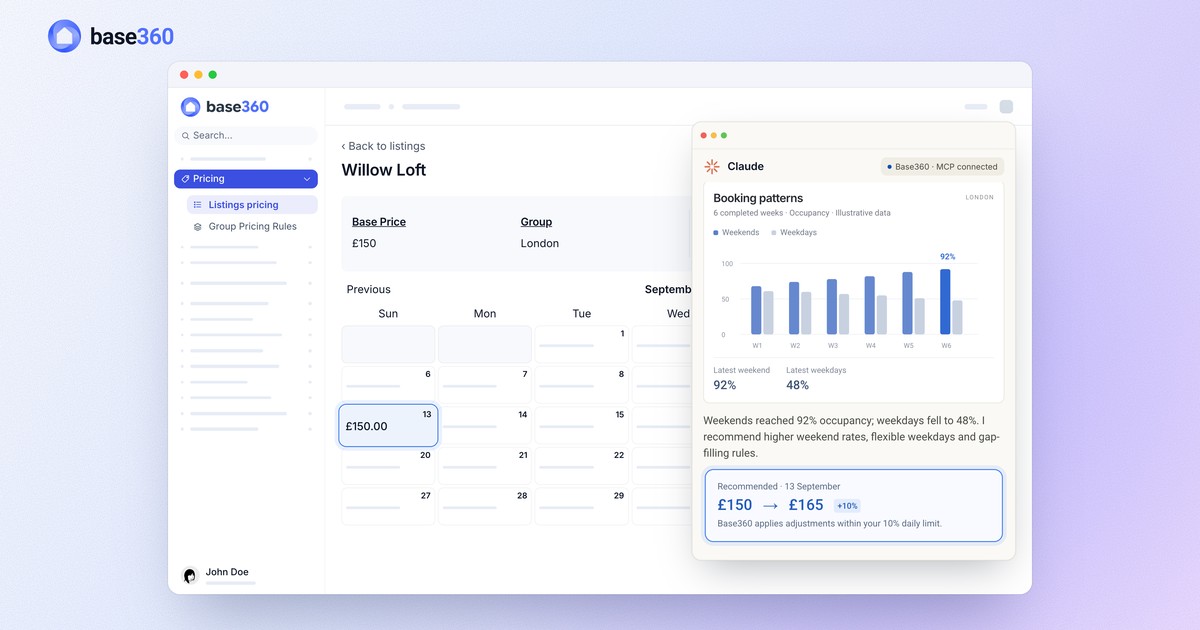
Claude reads your past bookings, finds the nights with high and low demand and suggests a price for each. You see the old and new price before anything is saved.
Then AI takes overFrom then on, the AI pricing agent adjusts each night’s price every day, up to 10% a day.
FAQ
Common questions
What is the Base360 MCP server?
It is how AI assistants connect to Base360. Add one connector URL to Claude, ChatGPT, Codex, Cursor or any other MCP client, sign in, and the assistant can read your Base360 data and answer questions about your listings, bookings, guests, cleaning, owners and finance.
Do I need a developer to connect Claude?
No. Copy the connector URL from AI Connections in your Base360 settings, add it to Claude as a custom connector and sign in to Base360. There is no API key or custom code.
What can Claude see in Base360?
Only what you can see. Claude works inside your own Base360 login and permissions, so a connection never sees more than the person who created it.
What can I ask Claude about my rentals?
Anything your own Base360 access can read: occupancy, prices and finance, tomorrow’s check-ins and cleans, guests waiting for a reply, reviews, owner statements and landlord leads. Claude answers with your data and lists the Base360 tools it used.
Can Claude change things in Base360?
Yes, if you allow it: Claude can create property records and house manuals and change prices. It shows each change first and saves nothing until you allow it once or always. Base360’s AI pricing agent then keeps adjusting each night within its daily limits.
Does it work with ChatGPT?
Yes. ChatGPT, Codex, Cursor and any other client that speaks MCP use the same connector URL to read your Base360 data.
Do I need a paid Claude plan?
No. Base360 is added to Claude as a custom connector, and Claude allows custom connectors on every plan, including Free (one custom connector). On Team and Enterprise plans, an owner adds Base360 for the organisation first. In Base360, the Claude connection is part of Autopilot and Enterprise.
Can I check where Claude’s numbers come from?
Yes. Claude lists each Base360 tool it calls in the conversation, such as the listings, occupancy, prices or finance it read, so you can open the same data in Base360 and compare.
Do Claude’s price changes go straight to Airbnb and Booking.com?
Not instantly. Saved prices are queued to your connected channel manager, and each channel then has to accept the update.
How is this different from Copilot?
Copilot is the AI assistant inside Base360. The MCP server brings your Base360 data into the assistant you already use, such as Claude or ChatGPT, next to your other work.
Read next
-
 Claude pricing guide How to connect Claude to your PMS and let it update your prices
 -
-
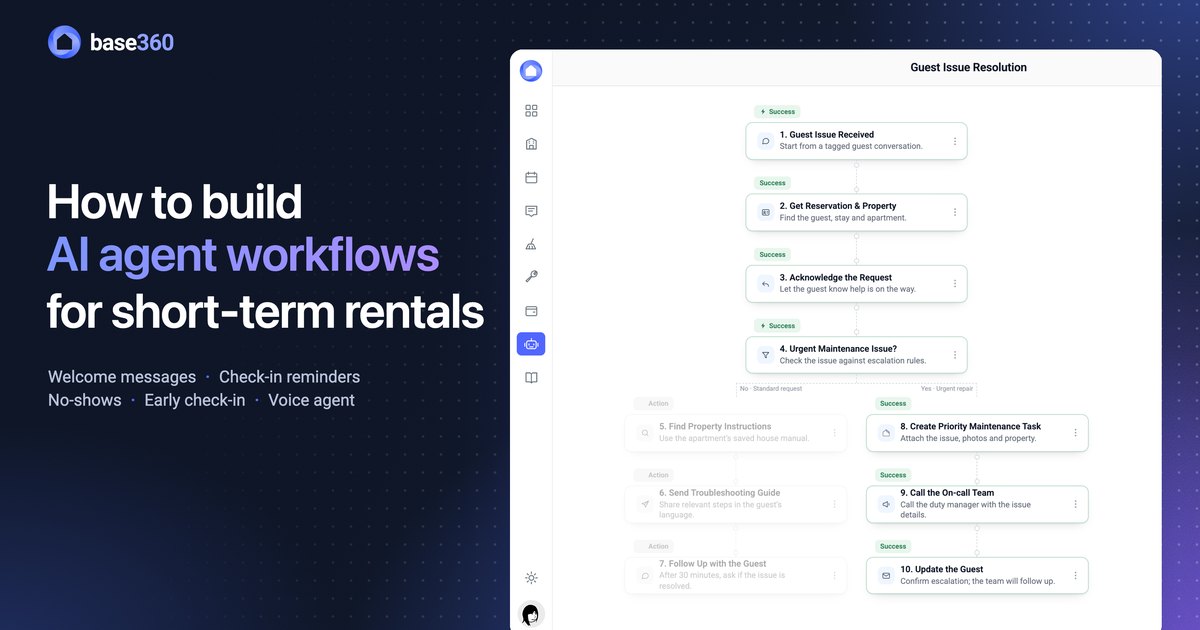 AI workflows guide How to build AI agent workflows for short-term rentals
 -
 AI operations guide AI-powered guest support and operation flow: who does what
Let’s talk about
your rental business.
Send us your questions or ideas, and we’ll get back to you soon.