

Where check-in goes wrong, hour by hour
Check-in instructions look like the easiest message you send. Yet each part of the trip has its own way to fail, from the day the guest books to the night they arrive:
| When | What goes wrong |
|---|---|
| At booking | The instructions arrive late, or nobody reads them. A guest booked three weeks ago and asks where the flat is. Airbnb hasn’t shown them your instructions yet, and the guest who booked on Booking.com reads a different copy. |
| Weeks before arrival | The code goes out too early. A lockbox code went out with the booking confirmation, before anyone checked the guest’s ID or took the deposit. |
| On the street | The guest can’t find the entrance. The address leads to the right street but the wrong door, and nothing says where to park. |
| On the doorstep | The code is lost in a long message. Your check-in message runs to a full screen, and with a suitcase in one hand the guest scrolls past the code twice. |
| At 2am | “The door code doesn’t work.” The lock is offline, so the new code never reached it. The guest’s app still shows an old code, and there is no backup way in. |
| When a rule changes | Every property has its own copy. The bin collection day changes, and you edit the house rules in twelve listings, one by one. One gets missed. |
Read down the first column and the pattern is timing: what the guest sees, and when. So start with when Airbnb itself shows your instructions.
When Airbnb shows your instructions
Airbnb splits check-in into two parts. Guests see your check-in method, such as a smart lock, keypad or lockbox, on your listing. But the detailed instructions only appear 48 hours before check-in, and guests find them on their trip itinerary at that point.
Before then, you can send your own. Airbnb’s scheduled quick replies go out at a time you set around the booking, check-in or checkout, and each one holds up to 4,000 characters. If you connect a smart lock to Airbnb, each guest gets their own code, sent when the booking is confirmed and active only from check-in to checkout. An “entry code” placeholder fills it into your messages. That connection, though, works with a few lock brands, in the US and Canada only (checked 14 October 2026).
Other booking sites keep their own copy. Booking.com stores arrival details in its own key collection setting, with a primary and an alternative check-in method. So the instructions that matter most are the ones you keep outside any single channel, starting with a good template.
A check-in instructions template
Good check-in instructions answer the guest’s questions in the order they walk: how do I get there, which door, how do I get in? Seven parts cover it for any short-term or vacation rental. Here they are, filled in for Willow Loft:
| Part | Example |
|---|---|
| Address and getting there | A map pin on the door itself: the blue door next to the pharmacy. No street parking; the station is a 5-minute walk. |
| Times | Check-in from 15:00, checkout by 10:00. Arriving early? Message us first. |
| Entrance | Through the blue door, up to the second floor, flat 4 on the left. |
| Keys or door code | The lockbox is to the right of the flat door. Your code appears in your check-in link on arrival day. |
| Wi-Fi and house rules | WillowLoft-Guest, with the password on the router. Quiet after 22:00, no smoking, no pets. |
| Checkout | Start the dishwasher and leave the keys in the lockbox. |
| Contact and backup entry | Reply in this chat. If the code doesn’t work, a spare key is with our key-holding service. |
Keep each part to a line or two, because guests read it on a phone, often on the doorstep. If you use a keypad or smart lock, or meet guests in person, only the Keys row changes. A template is what you say. When you say it matters just as much, so the next step is splitting it across the stay.
Three example check-in messages
Instead of one long message, send three short ones. Each carries only what the guest needs at that moment. The examples below use a demo booking: Alex Morgan, staying at Willow Loft from Saturday to Tuesday.
At bookingHi Alex, check-in is from 15:00 on Saturday. Please complete your check-in link before you travel. Your door code appears there on arrival day.
48 hours beforeHi Alex, see you Saturday. Willow Loft is the blue door next to the pharmacy, with no street parking. What time will you arrive?
Arrival day, 15:00Hi Alex, your door code is now in your check-in link. If anything doesn’t work, reply here.
Notice that none of the three messages contains the code. It sits in the link and appears at the time you set. A code in a message can be forwarded, or buried under later messages by the time the guest needs it. And you don’t have to chase guests by hand: in Base360, a ready-made AI agent template reminds guests whose pre-check-in is still incomplete, by default three days before arrival, and checks again the day before. For direct and website bookings, two more templates send a welcome email when the booking comes in and another at check-in time.
Good to knowIf your smart lock is connected to Airbnb, Airbnb sends its own code. Use its entry code placeholder in your messages instead of typing a code.
Even with the right messages at the right time, some arrivals still go wrong. So it helps to know your steps before the guest writes.
When the door code doesn’t work
When a guest writes that the door code is not working, go through these in order:
- Check which code they are using. An old code from an earlier message, or one still showing in their app, is easy to mix up with the new one.
- Check the lock’s status. On Airbnb, “Door code pending” means the code hasn’t synced to the lock yet. The lock may be offline, or its battery may be low.
- Check whether the code was changed in the lock’s own app. Airbnb sets it back to its own code at the next sync.
- Use your backup way in. If the lock is offline, Airbnb may share a backup door code with the guest. For a lockbox, a spare key nearby or a key-holding service does the same job.
- Stay in the chat until they are inside. A photo of the keypad or lockbox often shows the problem faster than a description.
- Write down the fix. Add what happened to your lockout procedure, so the next person on shift knows what to do.
Most of this list depends on having the right answer ready the moment the guest writes. Base360 keeps that answer ready.
Base360, from booking to the door
Base360 runs check-in from one private link per booking, for Airbnb and your other connected channels. Here is what it does at each of those moments:
- At booking: each booking gets its own check-in link, sent after booking.
- Before arrival: the code appears at the time you set, once the steps you require, such as ID and deposit, are done.
- On the street: a map in the link, and parking and building details in the house manual.
- On the doorstep: the link moves one step at a time, from the map to the door.
- At 2am: the code sits in the link, not buried in a message, and your lockout steps and your team are ready when the guest writes.
- When a rule changes: one check-in template covers a group of properties, and house rules live in shared house manuals.
The sections below show how each one works, or you can book a 30-minute demo to see it with your own properties.
One check-in link per booking
Base360 creates a private check-in link for each booking and sends it by email or message after booking. So the guest has the instructions from day one, without waiting for Airbnb’s 48-hour window. It works for bookings from Airbnb, Booking.com and your other connected channels, and you can leave a channel out. The guest opens it on their phone, with no app to download.
The link follows the guest’s walk: a map to the building, where to find the lockbox, the code, getting into the flat, and then the house manual with the Wi-Fi and the rules. And if a guest hasn’t finished check-in, a ready-made AI agent template reminds them three days and one day before arrival. Our online check-in guide covers the ID and payment steps in the same link.
The code waits for the guest
Base360 shows the door code at the release time you set, such as 15:00 on arrival day. So a guest who booked weeks ago can’t pass the code on before their stay.

You also choose which steps must come first. If the ID check and the deposit are required, the code stays hidden until the ID is approved and the deposit is in place. A cancelled booking can’t see the code. Optional steps, such as extras, don’t hold it back.
With supported smart locks, access works only during the stay, and an approved early check-in or late checkout can extend it. And if you use KeyNest, a key-holding service, you can keep a backup key there for the day a code fails.
TipA ready-made AI agent template looks for arrivals whose code was never revealed, so your team can check on a possible no-show. Our AI agent workflows guide shows how to switch one on.
One template for many properties
Base360 lets one check-in template cover a group of properties, such as every flat in a city. The template holds the steps and the code’s release rule, so you change it once and every property on it follows. For example, 12 London flats can share one template.
What differs per home stays on the property: its code, its lockbox and its directions to the door. The Wi-Fi, parking and house rules live in house manuals, which you can share with selected properties and change for a single unit where it differs.
So a new property starts with the journey the others already use. Our guide to managing multiple Airbnb properties covers the rest of the daily work.
Who answers at 2am
Base360’s inbox AI answers guest questions from your active house manual and knowledge base. So a guest asking for the Wi-Fi at 2am gets an answer from the same manual the link shows. With auto-reply on, eligible replies go straight to the guest. Otherwise it waits as a draft for your team.
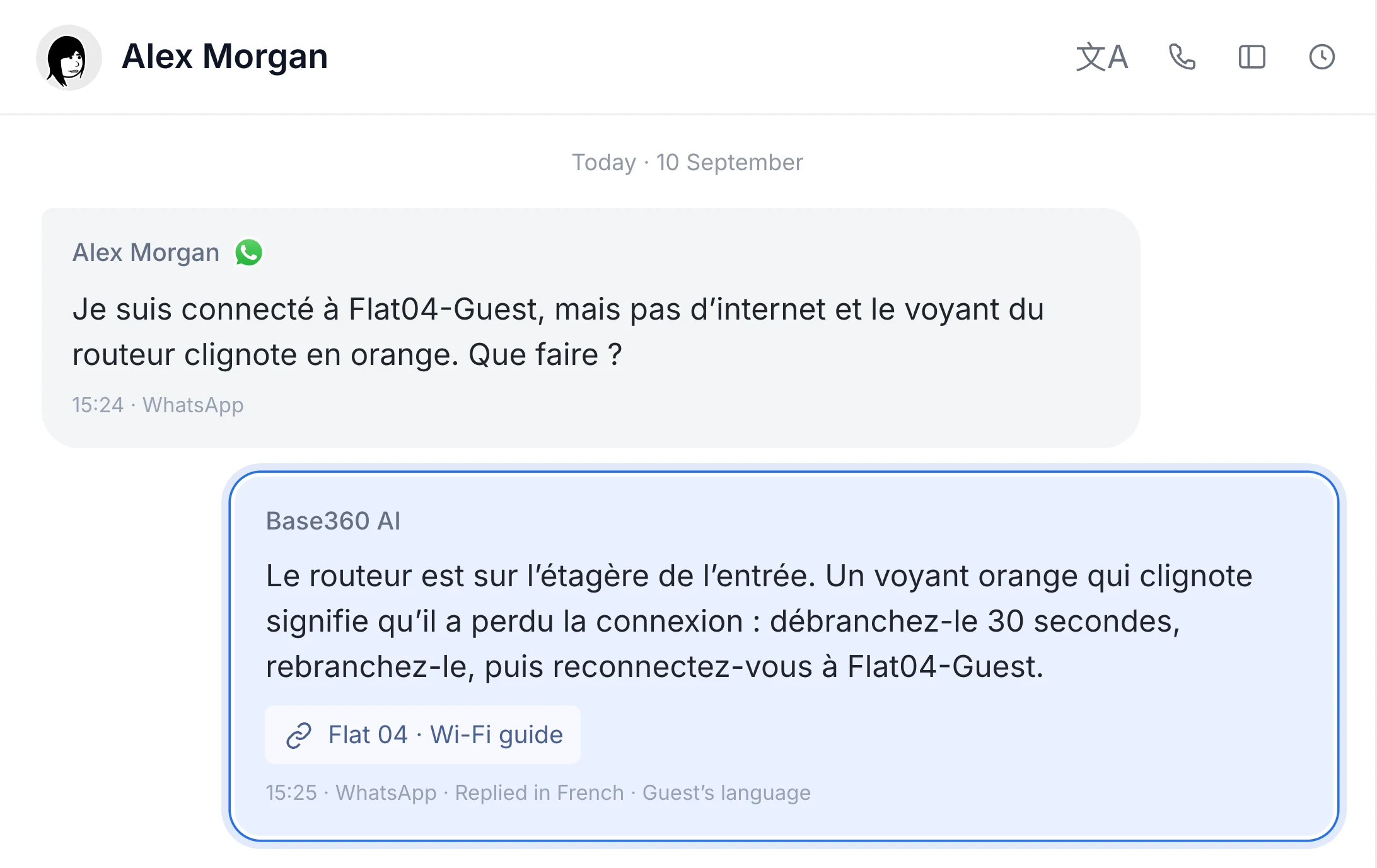
When it isn’t sure, it doesn’t guess. It hands the conversation to a person and shows why. Door codes stay in the check-in link, so a guest who can’t get in reaches your team, and a lockout procedure in the knowledge base keeps the steps the same whoever is on shift. For the nights that can’t wait, a workflow that starts when a conversation is tagged urgent can ring a teammate in the Base360 app. Our unified inbox guide goes deeper, or you can book a 30-minute demo to see it with your own properties.
Questions hosts ask about check-in
What should Airbnb check-in instructions include?
The address with a map pin and a landmark, check-in and checkout times, how to get there and where to park, the way from the street to your door, how the keys or door code work, the Wi-Fi, the few house rules that matter most, what to do at checkout, and who to contact, with a backup way in if the code fails. Keep each part short: guests read it on a phone, on the doorstep.
When should I send check-in instructions to Airbnb guests?
Airbnb shows your detailed check-in instructions on the guest’s trip itinerary 48 hours before check-in, not at booking. So most hosts send three messages of their own: a check-in link at booking, directions and parking 48 hours before, and a short note on arrival day when the door code becomes available.
What does “door code pending” mean on Airbnb?
It means Airbnb has created the guest’s code but it hasn’t synced to your smart lock yet. The lock may be offline because of its connection, a low battery or another issue. Check the lock’s connection and battery before the guest arrives.
Why is my guest’s Airbnb door code not working?
Check which code they are using, then the lock’s status and battery. If the lock is offline, Airbnb may share a backup code; otherwise use your own backup way in, such as a spare key nearby. In Base360, the code sits in the check-in link rather than in a message, and if you use KeyNest, a backup key there covers the day a code fails.
Should I put the door code in the check-in message?
It is safer not to. A code in a message can be forwarded or buried under later messages. Put it in a check-in link that shows it at the time you set, or use Airbnb’s entry code placeholder if you connect a smart lock to Airbnb.
Can I use the same check-in instructions for Airbnb and Booking.com?
Yes, if they live outside the booking sites. Airbnb keeps check-in instructions in its arrival guide and Booking.com keeps arrival details in its own key collection setting, so copies drift apart. A property management system for short-term and vacation rentals, such as Base360, sends one check-in link to each booking from Airbnb, Booking.com and your other connected channels.
How do I send check-in instructions automatically for multiple properties?
Use one check-in template for a group of properties, such as every flat in a city, and keep what differs per home on the property itself. In Base360, a property management system for short-term rentals, each booking gets its own check-in link after booking, the template sets the steps and when the code appears, and Wi-Fi, parking and house rules come from house manuals you can share between properties.